
How do I spot fake admins pushing phishing app downloads?
What this guide covers
Help you recognize “fake admin / fake official notice / phishing app download” scams in groups: how @everyone and “holdings / dividends” talk lower your guard, and which signals mean you should stop clicking and installing.
Scope and prerequisites
- Based on a typical chat case found in DeBox communities, for security education only.
- Does not give download, install, or “join the meeting” steps, and does not review any specific meeting app.
- Unknown download addresses from the case are not made into clickable links.
DeBox will not send you to a random website in a group to install a “meeting app” or “internal app,” and will not require unknown software for holdings, dividends, or “asset protection.” Principles: don’t trust lightly, don’t click, don’t download, don’t approve.
Scam type and method
| Item | Detail |
|---|---|
| Type | Impersonating an admin / fake official notice / phishing software download |
| Common wrapping | “Project meeting,” “avoid risk control,” “holdings / dividends / asset protection” |
| Credibility props | “Support”-style nicknames, group-owner badge, @everyone, install screenshots |
| Goal | Push you into a fake meeting or malware environment, then account codes, wallet permissions, or asset actions |
Core risk: Installing unknown software—or entering accounts, codes, or seed phrases in an unknown environment—can lead to account theft, abused device permissions, or lost assets.
Case screenshot
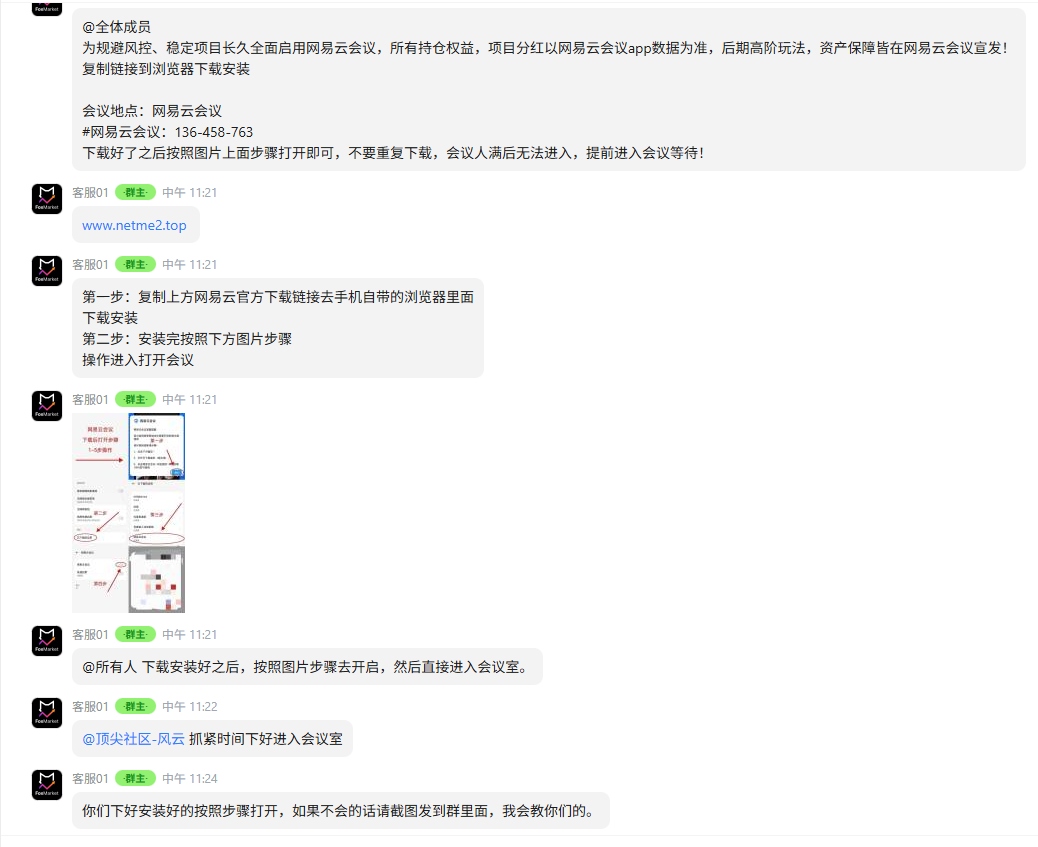
The image below is an archived group-chat case for security education. Use it only to match the phrases. Do not tap links in the image, and do not follow the install steps shown.
Typical flow
- Fake admin notice: Admin-style wording plus @everyone to look like an official announcement.
- Create urgency around the project: Tie “risk control, holdings, dividends, asset protection” to a supposed meeting.
- Unknown download address: Ask you to paste a link into the system browser and install a “meeting app” (unofficial domain, not an app store or official site).
- Install screenshots: Keep coaching “open browser → download → join the meeting.”
- Rush you in: @ members, “the room will be full,” “hurry”—so you skip verification.
Red flags in the screenshot
| Signal in the chat | Risk |
|---|---|
| @everyone | Announcement-style authority; easy to treat as official |
| “Holdings, dividends, asset protection” | Uses money anxiety to build trust and urgency |
| Unknown URL | Download outside official channels—the clearest high-risk signal here |
| Pushing an app install with pictures | The goal is getting software on your phone, not just sending a message |
| “You can’t join once the meeting is full” | Classic urgency so you skip checking |
Why this pattern is dangerous
It often does not ask for a transfer first. The chain is: fake official notice → unknown link → download → “join meeting” → more requests.
Once malware is installed, or you connect a wallet / sign / enter codes on an unknown page, the damage can be larger than opening a single link.
Safety reminders
- Don’t treat avatars, nicknames, or owner/admin badges as proof of identity.
- Don’t open software-download links sent by strangers in group chat.
- Don’t install “meeting apps,” “internal apps,” or “special APKs” from unofficial channels.
- Recheck any notice about BOX, stablecoins, staking, dividends, or asset protection through independent official channels.
- Never give anyone a seed phrase, private key, SMS code, or wallet secrets.
- Don’t connect a wallet, sign, or approve inside unknown apps or pages.
If you already installed it
- Stop using the app. Don’t enter accounts, passwords, codes, or wallet info.
- Don’t connect a wallet or sign/approve anything unknown.
- Uninstall the app and check sensitive permissions (contacts, SMS, accessibility, etc.).
- If you entered a password: change it and look for unusual logins.
- If a seed phrase or private key may have leaked: move remaining assets to a wallet you control that was never exposed, and read What should I do if I already joined an unknown project?.
- Keep chat screenshots and account details, then report via feedback or the official support group (never paste seed phrases in public groups).
FAQ
They’re the group owner or “Support 01”—can I trust the notice?
Not based on the role alone. Badges and “support” nicknames can be spoofed or come from a stolen account. Check: is the domain official, is the app from the store/official site, and are they asking you to sideload unknown software?
They said it’s a well-known meeting product. Is that safe?
Borrowing a famous product name does not make the download official. If they send you off the app store to a random site, treat it as high risk.
I only saw the notice and didn’t download?
Don’t open the link or follow the pictures. See What are DeBox anti-fraud principles and common red flags?.
Related guides
- What are DeBox anti-fraud principles and common red flags?
- How do I spot fake “hold USDT and earn yield” scams?
- What should I do if I already joined an unknown project?
- How do I submit feedback?
Security content must be confirmed by product/security or ops before it is treated as final public guidance. The case screenshot includes chat text for education; confirm redaction before treating this as final. This page is not a review of any meeting product.