DeBox Membership Center guide
What this guide covers
Helps you use the DeBox Membership Center: view membership status, understand three tiers, subscribe or renew, toggle auto-renewal, gift membership, open the member backend, view purchase history, and contact support.
Requirements and before you start
- Membership Center: https://debox.pro/premium/ (or enter from App Me, per current version).
- Sign in to view membership status and purchase history; when signed out you can usually browse tier benefits only.
- Payment uses BSC (BNB Smart Chain). Prepare:
| Item | Notes |
|---|---|
| Small amount of BNB | For Gas fees—a small amount is enough |
| USDT or BOX | For membership payment—choose one |
- Read and agree to the Membership Service Agreement before subscribing.
Membership payment involves on-chain authorization and charges. Auto-renewal takes effect only after the corresponding authorization. Gift payments usually cannot be reversed—verify the recipient carefully. Never send your seed phrase, private key, or PIN to anyone.
Membership tiers
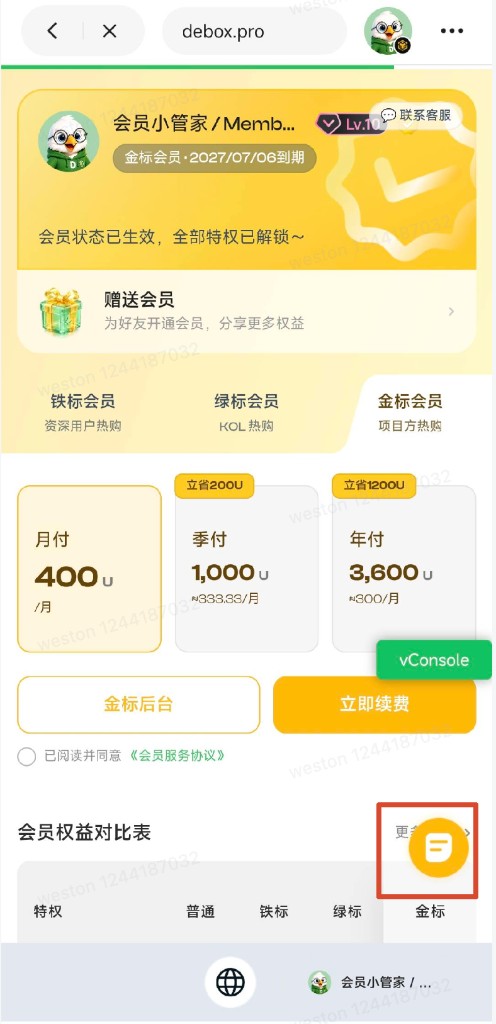
DeBox offers three membership tiers:
| Tier | Intended audience (product copy) |
|---|---|
| Iron Badge | Professionals / power users |
| Green Badge | Key opinion leaders (KOLs) |
| Gold Badge | Project teams |
After activation you get an exclusive badge, higher chat and content limits, voice room and group capabilities, and more. See the benefits table below and the benefits detail page.
Steps
1. View membership status
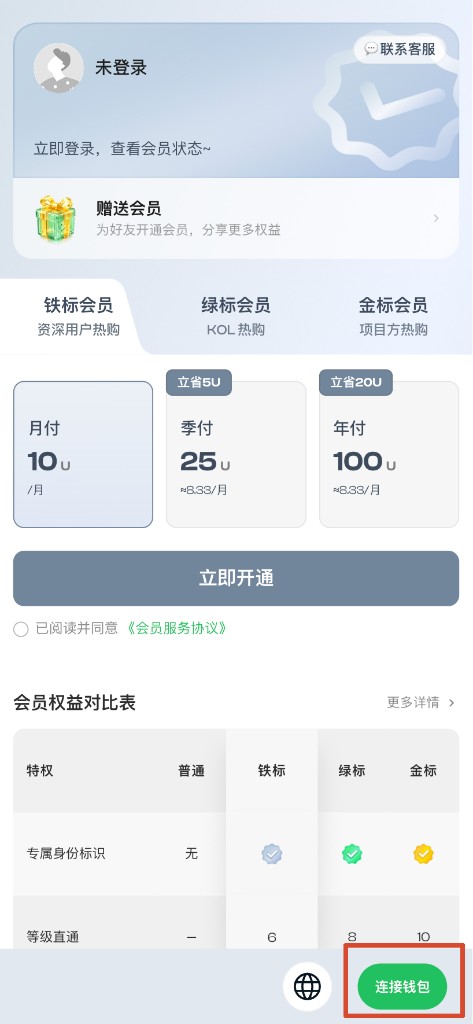
- Open Membership Center.
- Tap the sign-in entry at the bottom (e.g. Connect wallet) and complete sign-in.
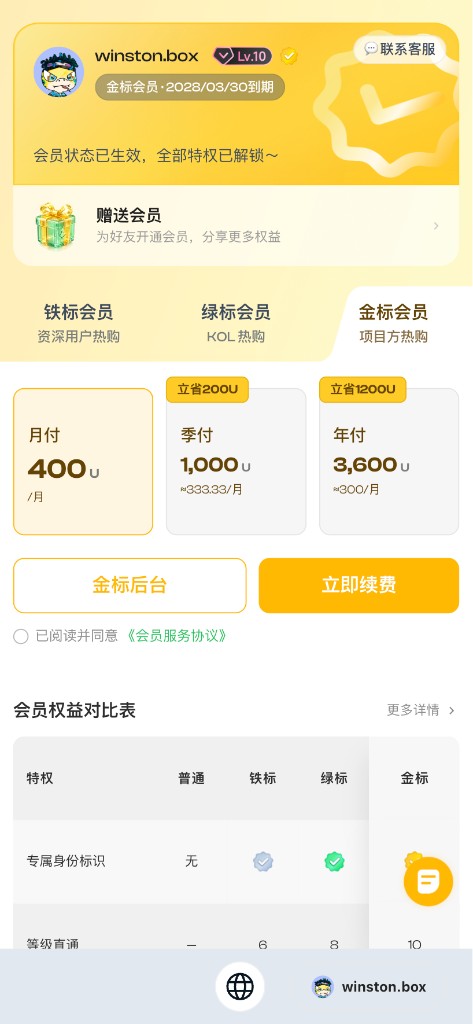
- After sign-in, view avatar and nickname at the top.
- In the same area, view current tier and expiry date.
When signed out, the top usually shows Not signed in with sign-in guidance.


2. Compare membership tiers
- Find Iron Badge, Green Badge, and Gold Badge at the top.
- Tap the tier you want to review.
- Scroll to the Membership benefits comparison table.
- Tap More details for the full benefits page: https://debox.pro/premium/benefits/.
You can browse all tiers; switching tabs is for comparison only and does not downgrade you.
Benefits comparison summary
| Module | Benefit | Regular | Iron | Green | Gold | After expiry |
|---|---|---|---|---|---|---|
| Identity | Exclusive badge | — | Iron Badge | Green Badge | Gold Badge | Badge expires |
| Identity | Direct level boost | — | 6 | 8 | 10 | — |
| Identity | Dedicated account manager | — | — | — | ✓ | — |
| Projects | Dedicated content backend | — | — | — | ✓ | Backend access revoked |
| Projects | Long-form publishing | — | — | — | ✓ | Publishing revoked |
| Projects | Mobile file send | — | 100MB | 300MB | 500MB | Limited by current level |
| Community | No in-group friend adds | — | — | ✓ | ✓ | New use not allowed |
| Community | Custom in-group nickname | — | ✓ | ✓ | ✓ | Existing kept; new settings blocked |
| Content | Daily 1v1 voice time | 1 hr/day | 6 hr/day | 10 hr/day | Unlimited | Reverts to regular |
| Content | IM message character limit | 1000 | 2000 | 3000 | 5000 | Reverts to regular |
| Content | Video length | 2 min | 5 min | 10 min | 20 min | Reverts to regular |
| Community | Follow limit | 1,000 | 2,000 | 5,000 | 10,000 | Existing follows kept; new restricted |
| Community | Voice room creation | 1 hr / 100 people | 2 hr / 500 people | 2 hr / 500 people | 2 hr / 500 people | Reverts to regular |
| Community | Ad / content review priority | Standard | Low risk | Low risk | Low risk | Reverts to regular |
| Community | Batch invite limit | 20 | 50 | 100 | 200 | Reverts to regular |
| Community | Mute silence rule | Silence after mutes in 3 groups | No silence | No silence | No silence | Reverts to regular |
| Community | Follow-subscribe / asset push | 1 | 5 | 10 | 20 | Per product docs |
| Community | Bonus Energy | — | 300 | 300 | 300 | Granted once at activation |
| Privacy | Asset page viewing | — | — | ✓ | ✓ | Reverts to regular |
| Privacy | View hidden assets | — | — | — | ✓* | Reverts to regular |
* Scope of View hidden assets follows product docs. If values differ from the live App, follow the current page.
3. Subscribe or renew membership
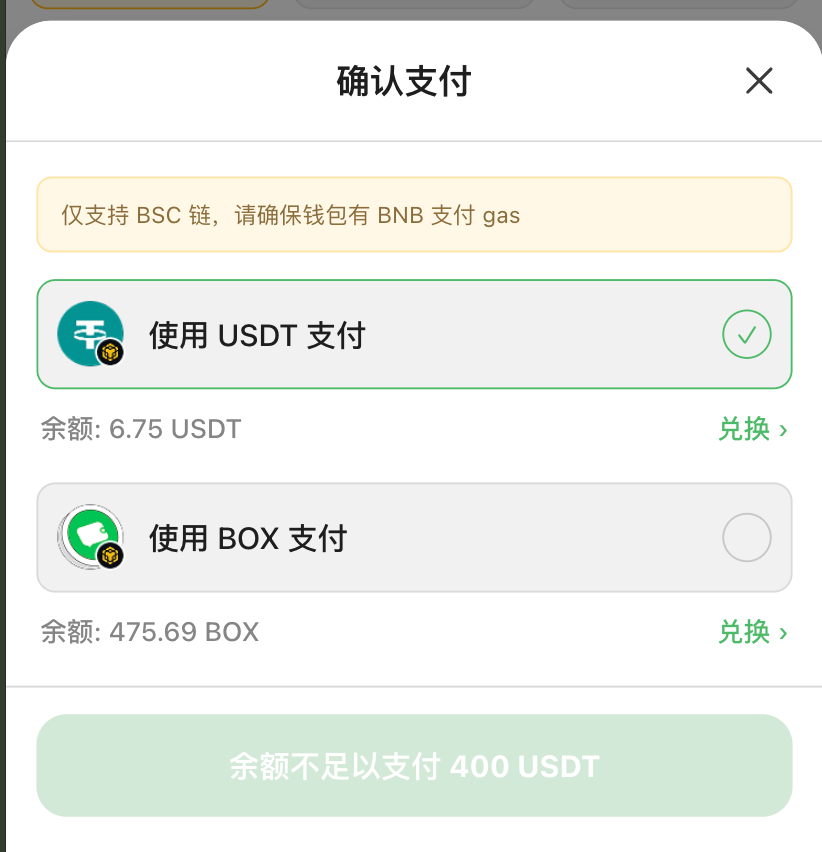
The payment page notes: BSC chain only—ensure your wallet has BNB for Gas.
- Open Membership Center and sign in.
- Confirm current tier and expiry at the top.
- Tap the tier to activate (Iron / Green / Gold).
- Choose plan duration (e.g. monthly, quarterly, annual—prices on plan cards).
- Check I have read and agree to the Membership Service Agreement.
- Tap Subscribe now or Renew now.
- In Confirm payment, choose USDT or BOX.
- Check balance; if sufficient, tap the bottom pay button.
- After success, confirm updated membership status at the top.

- Check USDT / BOX balance in the payment modal.
- Tap Exchange > next to balance to swap or top up.
- Return and retry; or ask a friend to gift membership.
When balance is insufficient, the button may show something like Insufficient balance to pay xxx USDT.
If you already have a higher tier, you cannot buy a lower one. E.g. with Green Badge you cannot buy Iron Badge; subscribe/renew buttons are disabled on lower tiers.
4. Turn auto-renewal on or off
Visible only when signed in, viewing your own active tier; monthly plans only.
- After sign-in, open your current tier page.
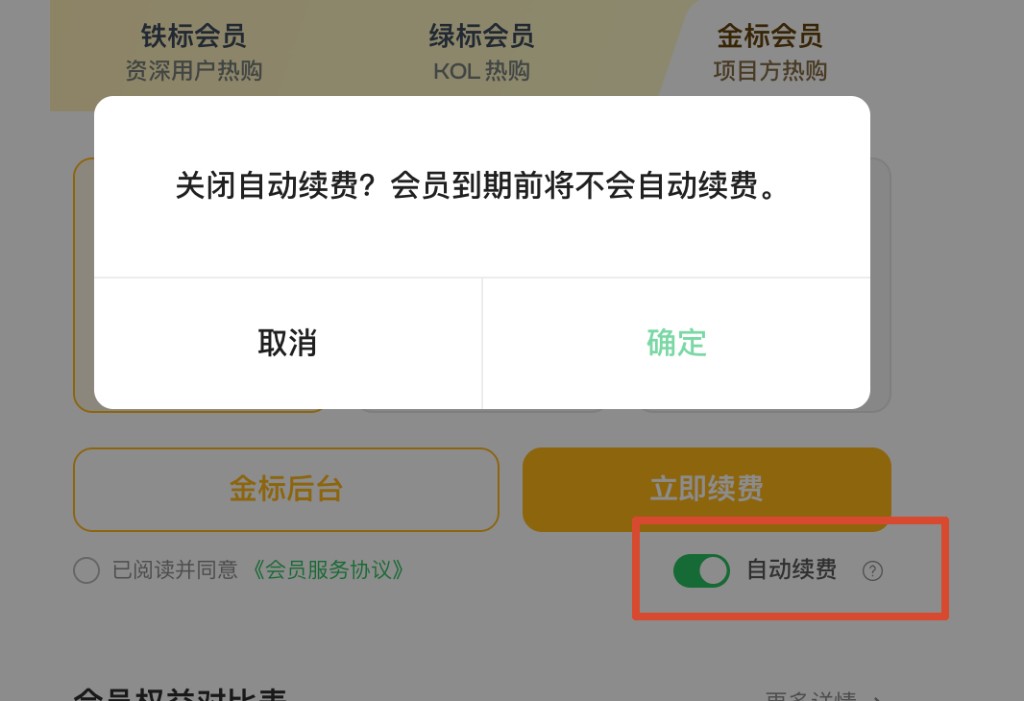
- Find the Auto-renewal toggle near the pay button.
- Tap the help icon for auto-renewal rules.
- Turn the toggle on to enable.
- To disable, confirm in the modal: Turn off auto-renewal? Membership will not renew automatically before expiry. Tap Confirm.
Charge order before expiry: system tries USDT → BOX; complete authorization in advance.

5. Open member backend
Visible for Green or Gold Badge when viewing your own current tier: Green Badge backend or Gold Badge backend.
- Switch to your current tier.
- Tap Green Badge backend or Gold Badge backend.
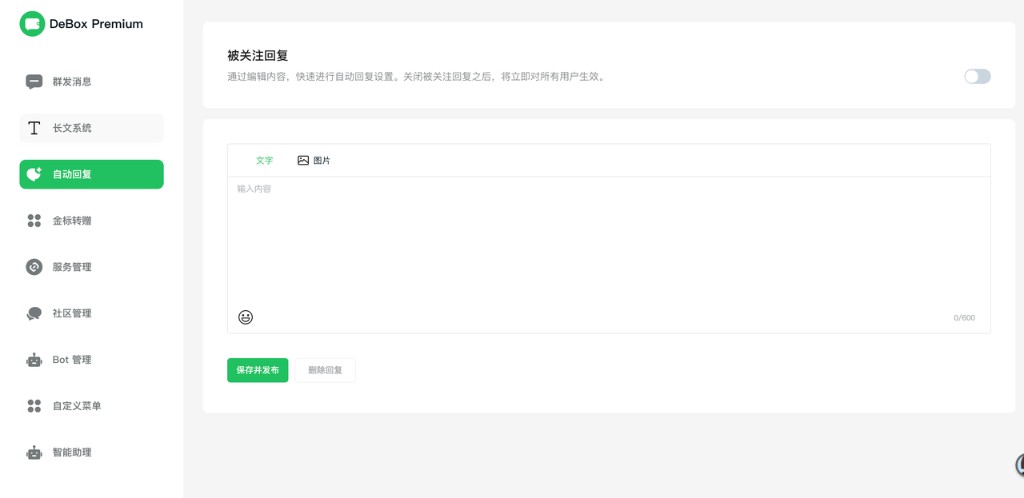
- Use broadcast messages, long-form system, auto-reply, community management, Bot management, etc. (menus vary by tier).

6. Gift membership to a friend
Entry: https://debox.pro/premium/gift/, or tap Gift membership on Membership Center home.
Use when a friend cannot subscribe, has no wallet balance, or you want to unlock benefits for them directly.
- Open the gift page and sign in.
- Under Recipient, search/enter the friend's wallet address and confirm (cannot gift to yourself).
- Choose tier (Iron / Green / Gold) and plan duration.
- Tap Confirm gift to friend.
- In Confirm payment, choose USDT or BOX; confirm small BNB for Gas.
- Complete payment; after success, the friend gets the corresponding benefits.

You can gift a tier lower than yours; if the friend already has a higher tier, you usually cannot gift a lower one.
7. View purchase history
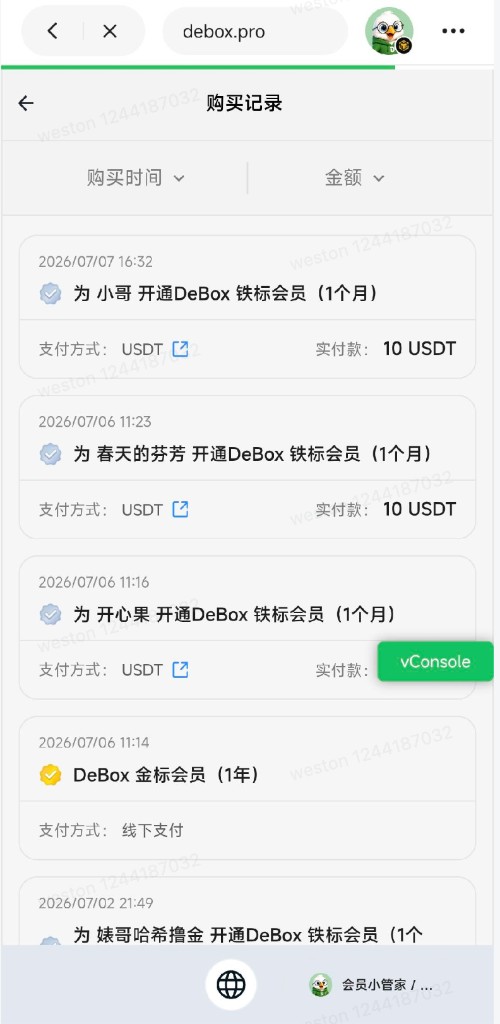
- After sign-in, find the draggable purchase history icon at bottom-right.
- Tap to open Purchase history.
- Review past orders (self-purchase, gifts to friends, payment method, amount, etc.).
- On-chain payments may link to a block explorer; Offline payment may also appear.


8. Contact support
Tap Contact support at the top-right of the membership card and follow prompts. Example support card: https://m.debox.pro/card?id=sonwurxd (actual redirect follows the page).
Tips
- Sign in to view membership status and purchase history.
- Check the Membership Service Agreement before paying.
- After turning off auto-renewal, renew manually before expiry.
- After expiry, some benefits revert to regular user limits—see After expiry in benefits docs.
- Verify gift recipients carefully; payment usually cannot be reversed.
- If payment fails, check BSC chain and BNB/USDT/BOX balance, or contact support.
Common questions
What do I need to subscribe?
USDT or BOX on BSC for membership fee, plus a small amount of BNB for Gas.
Why does the pay button say Insufficient balance to pay xxx USDT?
Selected token balance is too low. Tap Exchange to top up, or switch payment method if the other token has enough balance.
How much BNB do I need?
Only a small amount for Gas—exact amount depends on network conditions at payment time.
My friend can't subscribe—what can I do?
Use Gift membership: choose friend, tier, plan, and pay to activate for them.
How long until a gift takes effect?
Usually immediately after successful payment.
Can I gift to myself?
No. Subscribe for yourself in Membership Center.
USDT or BOX?
Either works—use whichever has more balance.
Still failing after topping up?
Check BSC network, sufficient BNB, and that balance has arrived, or contact support.
Why can't I see my membership info?
Sign in first. If still showing not subscribed after sign-in, the account has no active membership.
Already a member—can I buy a lower tier?
No. The system blocks tiers below your current one.
How do I renew?
Open your current tier, choose a plan, agree to terms, tap Renew now, and pay.
How does auto-renewal charge?
Before expiry, USDT first, then BOX if insufficient; monthly plans only.
How do I turn off auto-renewal?
Turn off the toggle on your current tier page and confirm in the modal.
What happens when membership expires?
Exclusive badge and some advanced features expire—see After expiry in benefits docs.
What is the Green/Gold member backend?
Manage exclusive features like broadcast, long-form, auto-reply, community and Bot management—varies by tier.
Difference between comparison table and More details?
Home table is a core summary; More details has full categories and expiry rules.
Agreement modal during payment?
You have not agreed to terms yet. Agree and continue, or check the agreement box before paying.
Related guides
Review notes
This article covers paid membership, auto-renewal, and gifting. Status is pending-human-review—product and ops review required. Plan prices and benefit values follow live Membership Center display.