
How do I use Level & Energy Center?
What this guide covers
Level & Energy Center is DeBox’s core growth system. You earn Energy through daily use, spend it on community actions, and that spend becomes upgrade progress—higher levels usually mean a more active presence.
In short:
- Energy ≈ your community “action power”
- Level ≈ your activity badge
- Spend Energy → gain progress → level up
From Me → Level Energy, open Energy Center to check in, complete earn tasks, review spend and history, upgrade, manage protection, and view the leaderboard.
Shorter path: How do I upgrade my account level?.
This guide is account level & Energy. Paid tiers (Iron / Green / Gold) are covered in How do I use the Membership Center?.
Requirements and before you start
- You are signed in to DeBox.
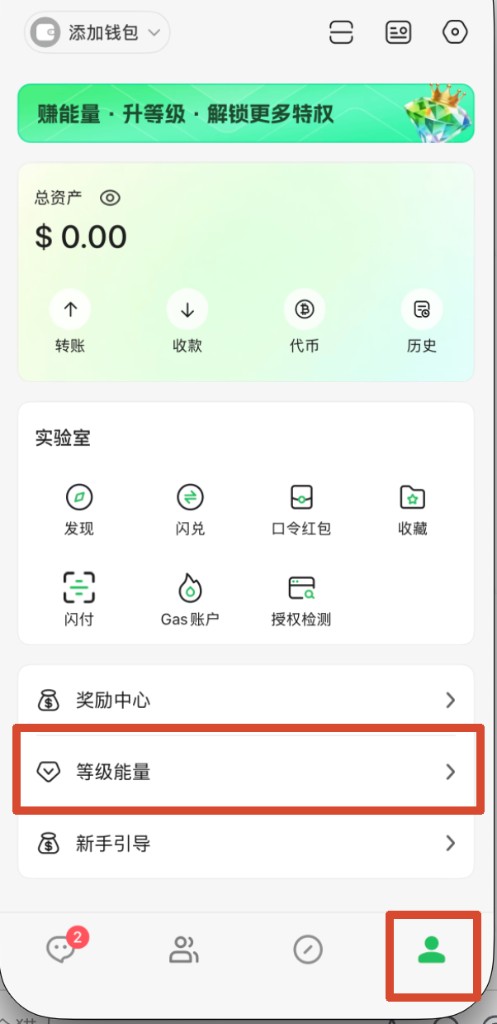
- Entry: bottom Me → Level Energy (opens Energy Center).
- New users often start with about 10 Energy and Lv.1; numbers follow the live App.
- Paid upgrade / Level Boost involves payment—verify amount and network first.
- Details follow the top-right Rules page. Rewards may change by version.
If Home shows protection is off, Energy may decay daily. Any one of these usually exempts decay that day: Membership, holding an official NFT, or holding BOX worth about ≥ 100U (follow Rules). You can also follow on-page Enable protection.
Steps
1. Open Energy Center
- Open DeBox and switch to bottom Me.
- Tap Level Energy.
- Switch among Home, Earn, Spend, History, Leaderboard.
- Open Rules from the top-right on any tab.
2. Home: Energy, check-in, and upgrade
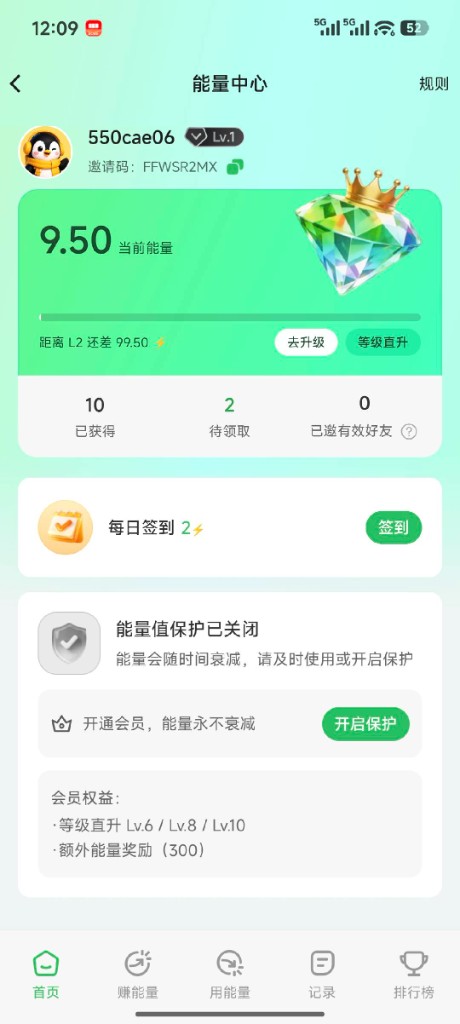
On Home you can:
- View current Energy, level, and progress to the next level.
- Copy your invite code.
- Tap Check in (usually about +2, once per day).
- Use Upgrade / Instant upgrade, custom spend, or Paid upgrade / Level Boost (follow on-page labels).
- Review earned / pending / valid invites.
- If protection is off, enable it or open Membership.
3. How to earn Energy
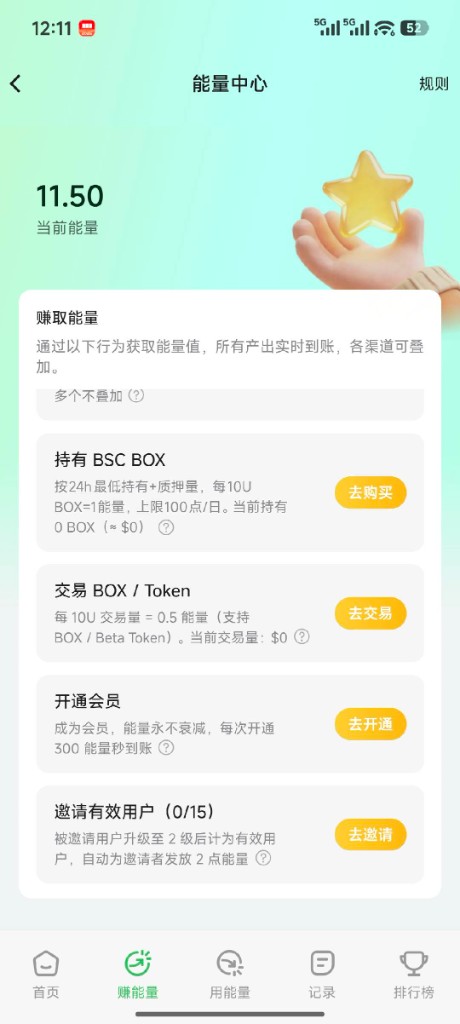
Open Earn. Methods usually stack; credit is often real-time. Common sources (follow the list / Rules):
| Method | Typical rule |
|---|---|
| New-user grant | About 10 Energy on first entry |
| Daily check-in | About +2 / day, once per day |
| Hold official NFT | About +3 / day when you hold a DeBox official NFT; multiple NFTs usually still claim once per day |
| Hold / stake BOX | About +1 Energy per ~10U BOX; daily claim cap about 100 |
| Trade BOX / Beta Token | In-app trading often converts about 5% of volume into Energy (follow the page) |
| Invite friends | When a friend reaches Lv.2, you get about +2; up to about 15 valid friends per day |
| Open Membership / VIP | Often about +300 once, plus possible level skip (see below) |
Quick actions
- Hold BOX: find the hold task; Buy if needed, then claim.
- Trade: Go trade, then return to claim (BOX / Beta Token etc.).
- Membership: Activate—see How do I use the Membership Center?.
- Invite: share code/link; validity follows Invite valid users on the page.
4. How Energy is spent
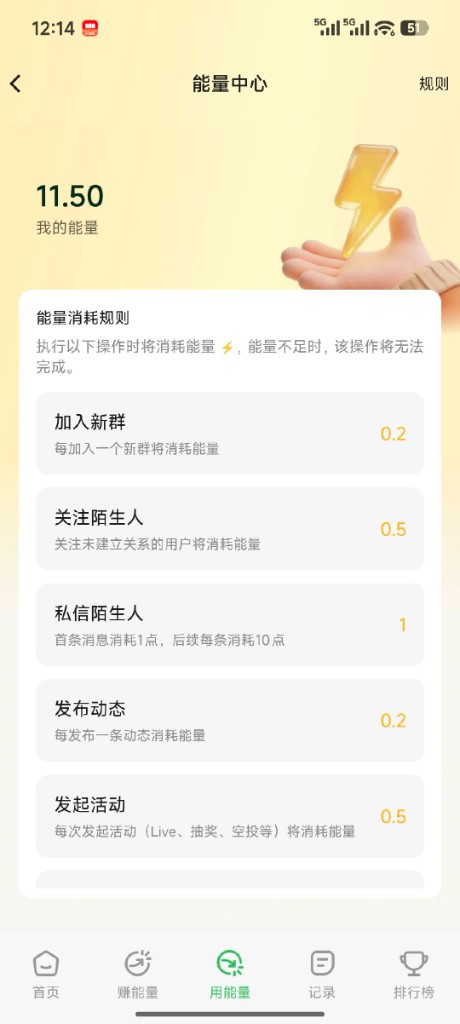
Open Spend and review cost rules. If Energy is too low, the action usually fails.
Common costs (follow the live list):
| Action | Typical cost |
|---|---|
| Join a group | 0.2 |
| Follow another user | 0.5 |
| Post a Moment | 0.2 |
| Comment | 0.2 |
| Create an activity | 0.5 |
| Message a stranger | About 1 |
Related rules (follow the App):
- Grab red packets: often need balance greater than 10.
- Small groups: groups with about ≤ 30 members may not charge Energy for red packets.
- Violations: about 5 Energy may be deducted for rule-breaking.
5. How levels work
- Normal community spend (join, Moments, follow, etc.) usually converts 1:1 into upgrade progress; full progress auto-levels you up.
- Levels usually only rise; decay affects balance, not level.
Typical progress table (per-level need / cumulative; follow Rules):
| Current → next | Progress needed | Cumulative |
|---|---|---|
| 1 → 2 | 100 | 100 |
| 2 → 3 | 200 | 300 |
| 3 → 4 | 400 | 700 |
| 4 → 5 | 800 | 1500 |
| 5 → 6 | 1600 | 3100 |
Higher tiers continue per on-page rules.
Three ways to speed up
1) Instant upgrade (top up remaining progress)
- Open Energy Center Home.
- Tap Upgrade / Instant upgrade.
- The App calculates remaining progress.
- Remaining progress is often filled at about an 80% Energy rate (≈20% discount).
- Confirm to rise one level.
2) Custom spend upgrade
- Enter how much Energy to spend.
- Spent Energy often converts to progress as ÷ 0.8.
- Overflow can carry to the next level (multi-level in one go, follow the modal).
3) Paid upgrade
- Choose Paid upgrade / Level Boost.
- Pay with USDT or BOX (follow the page).
- Success raises one level.
- You can gift a boost; recipients are often capped around Lv.5.
6. VIP level skip
Opening the matching VIP / Membership tier can jump you to a higher level and often grants about 300 Energy:
| VIP type | Typical skip to | Extra Energy |
|---|---|---|
| Iron VIP | Lv.6 | ~300 |
| Green VIP | Lv.8 | ~300 |
| Gold VIP | Lv.10 | ~300 |
Notes:
- If you are already above the skip level, level usually stays; Energy is still granted per rules.
- Each VIP tier’s skip usually applies once.
- See How do I use the Membership Center? and What benefits do different membership tiers offer?.
7. Energy decay
- Without protection, about 10% of your balance may decay each day.
- Decay often stops around the initial ~10 Energy floor (not to zero).
Exempt for the day (any one; follow Rules):
- You have Membership
- You hold an official DeBox NFT
- Your BOX holding is worth about ≥ 100U
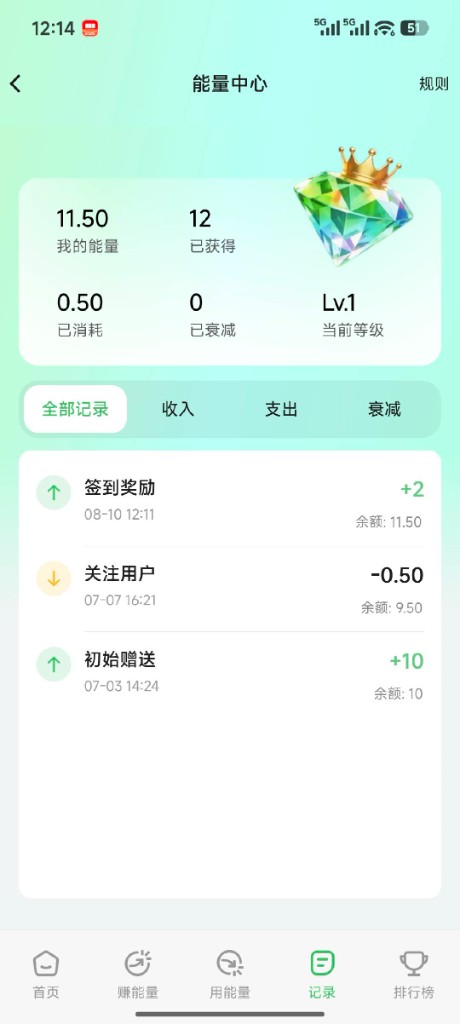
8. Energy history (ledger)
- Open History (or an in-page ledger entry, by version).
- Review level, balance, earned / spent / decayed totals.
- Filter All / Income / Expense / Decay.
- Check each check-in, grant, follow, etc.
9. Leaderboard
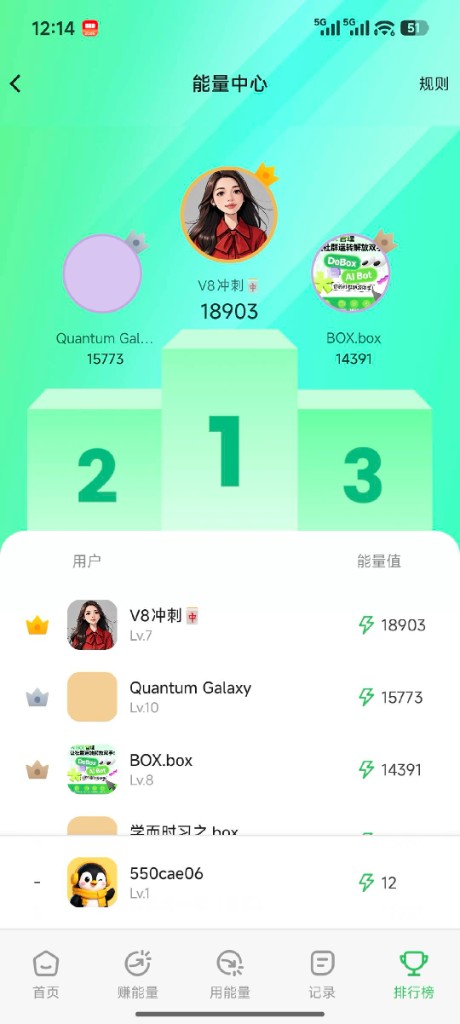
Open Leaderboard. Ranking usually uses Energy score:
Energy score ≈ current balance + historical normal spend
More healthy community spend usually means a higher score. Tap a user for their profile; your rank often appears at the bottom.
Tips
- Stay active or meet protection conditions to avoid daily decay.
- Energy is meant to be spent—normal use builds upgrade progress.
- Daily check-in (~+2) adds up.
- Inviting friends to Lv.2 is win-win; watch the daily valid-invite cap.
- Before red packets, confirm balance is above ~10; small-group rules follow the App.
- Follow community rules to avoid penalty deductions.
- Invite codes/nicknames in screenshots are examples—use your own page.
Common questions
What if I run out of Energy?
Check in the next day, or earn via BOX / NFT / trading / invites. Membership often grants ~300 at once (follow the page).
Why does Energy drop every day?
Usually daily decay (~10%). Membership, NFT, or enough BOX can exempt it. Check History → Decay.
Can my level drop?
Usually no. Decay only reduces balance.
Can I jump straight to a high level?
Use paid upgrades repeatedly, or Gold VIP skip to about Lv.10. Gifted paid upgrades often cap the recipient around Lv.5.
How is upgrade progress calculated?
Normal community spend usually converts 1:1. Instant upgrade fills the remainder at ~80% rate; custom upgrade converts the amount you choose.
Instant vs custom upgrade?
Instant calculates the gap and tops up one level at a discount. Custom lets you choose how much Energy to spend; overflow can multi-level (follow the modal).
Can I gift Energy to someone?
Balance usually cannot be transferred. You can gift a paid upgrade—you pay, they gain one level (cap follows the page).
How is the leaderboard ranked?
By Energy score = current balance + cumulative normal spend—not balance alone.
Why can’t I join a group, post, or grab red packets?
Not enough Energy, or below the red-packet minimum. Check Spend, then earn more.
What counts as a valid invite?
Follow Earn. Commonly the invitee reaches Lv.2 (~+2 to you), up to ~15 per day.
Paid upgrade succeeded but level unchanged?
On-chain confirmation can take time. Recheck later; if still wrong, keep payment info and use How do I submit feedback?.