
What are voice room passes and user benefits?
What this guide covers
Two layers of voice-room perks: account default create tier, and purchasable Lite / Pro / time / monthly passes. Create flow: How do I create and use a voice room?.
Requirements and before you start
- Entry: create page Current benefits / Upgrade / VIP pass, or ? on the VIP pass page.
- Prices and increments follow the live App; tables below are product guidance.
- Prepare tokens and Gas for on-chain purchase.
Verify amount and network when buying passes. Never share seed phrases, private keys, or PINs.
Two layers
| Layer | What | Effect | Typical use |
|---|---|---|---|
| Account default | Non-member / membership | Baseline Regular Live duration & capacity | Short meetings without buying cards |
| Voice room passes | Lite, Pro, time, monthly | Session stack or 30-day always-on | Large events, cast/record, always-on rooms |
In-progress Lives can also be upgraded (participants may apply a pass—follow the page).
Default create (no pass)
| Account | Default duration | Default capacity |
|---|---|---|
| Non-member | ~1 hour | ~100 people |
| Member | ~2 hours | ~500 people |
Membership: How do I use the Membership Center?. Membership only raises the default; expansion, cast, record, and always-on need passes.
Regular Live · Lite · Pro
| Perk | Regular Live | Lite | Pro |
|---|---|---|---|
| How | Default create | Stackable | Stackable |
| Price | Free | ~15 U / card | ~100 U / card |
| Duration | ~2 h (non-members often lower) | +1 h / card | +10 h / card |
| Max duration | ~2 h | ≤24 h | ≤24 h |
| Capacity | ~500 (non-members often lower) | +500 / card | +5000 / card |
| Hosts | 4 | 4 | 4 |
| Guests | 4 | 8 | 12 |
| Icon | None | None | 🔥 |
| Border | None | None | Dark-gold style etc. |
| Event pin | No | No | Yes |
| Screen share | — | Yes | Yes |
| Best for | Normal rooms | Light expansion | Project ads / large events |
Lite / Pro usually also support recording (same idea as time pass—follow whether Record Live can turn on). Bulk purchase discounts may apply.
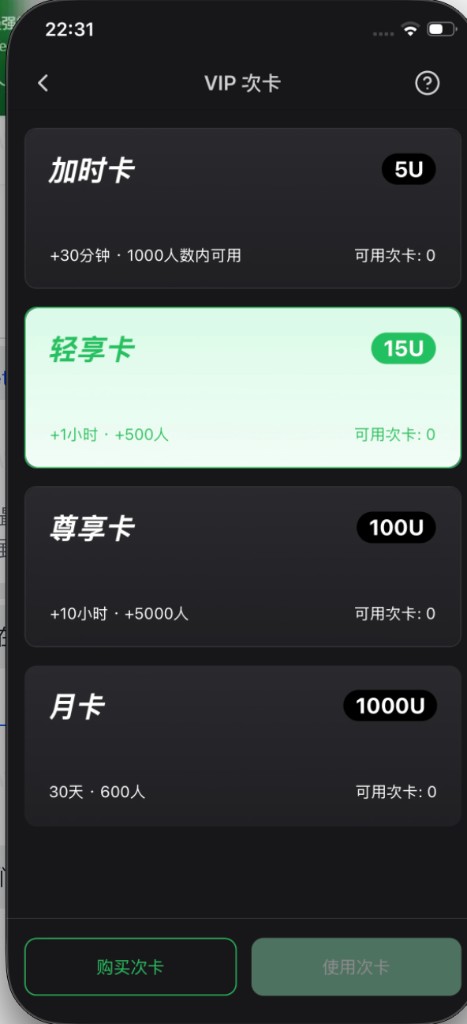
Time pass (hour pass)
| Item | Notes |
|---|---|
| Type | One-time add-on focused on extra time |
| Price example | Often ~5 U (follow App) |
| Duration | Often ~+30 minutes (follow card) |
| Screen share | Yes |
| Recording | Yes (after selecting this pass on create) |
| Best for | Enough seats, need more time, or unlock cast/record |
Monthly pass (always-on)
Product name: Monthly pass (always-on); price 1000 U / 30 days.
Base perks
- 30-day validity; room has unlimited session length within the countdown.
- Does not close when empty; host leaving keeps the room; host re-enters as host.
- Room ID kept; join via share link / QR card as before.
- Base caps: 100 people, hosts 4, guests 8.
- No screen share, no audio mix.
- No recording.
- Only one active monthly-pass room at a time.
- Display tier uses Lite, not higher than Pro / Super.
Stacking session passes
- Stack Lite / Pro / time passes for temporary capacity, screen share, etc.
- When stacked perks expire, room returns to monthly base 100 people.
- If online count is already over 100: do not kick; only block new joins until count falls naturally.
How to choose
- Occasional small rooms → membership default first.
- One session needs more time/size, cast, or record → Lite / Pro; mainly time or unlock cast/record → time pass.
- Always-on fixed room ID → monthly; stack session cards for large events / cast.
- Project campaigns with pin / strong branding → Pro.
Buy and use
- Create page VIP pass or in-room upgrade.
- Buy or Use.
- Benefits ? on VIP page.
- Recording only on supported cards; per-room start limits may apply.
Common questions
Membership + passes together?
Yes—membership raises default; passes upgrade the session or monthly room.
Can’t record?
Need a recordable pass (Lite / Pro / time). Monthly rooms cannot record.
Can monthly rooms screen-share?
Not on the monthly base; stack a cast-capable session pass temporarily.
After monthly expires?
Always-on perks end; stacked session perks expire by their own rules. Follow App prompts.
Docs vs App numbers?
Follow VIP pass cards and the in-app benefits page.