
How do I use GasToken?
What this guide covers
GasToken is DeBox Gas sponsorship for your wallet: your address and assets stay the same, while network fees for Swap, transfer, and similar actions can be deducted from Gas balance—so you do not need to hold each chain’s native token first (BNB, ETH, MATIC, etc.).
Common case: you mostly hold USDT and almost no native gas token. Deposit USDT (or another supported token) into GasToken, then run Swap/transfer with fees covered by Gas balance where supported.
Requirements and before you start
- You are signed in to DeBox with a usable wallet.
- Payment tokens and networks follow the deposit Select payment currency list (often major tokens on BNB Smart Chain / Ethereum / Base, such as USDT, USDC, BNB, BOX).
- Minimum deposit/withdraw is commonly about 1 USDT (follow the page).
- Sensitive actions still need your confirmation (signature, biometrics, or PIN).
- If you do not have USDT yet, see How do I receive USDT or BNB?.
That is the point of GasToken: pay network fees from Gas balance, instead of stocking native tokens on every chain. After depositing USDT (etc.), keep sponsorship on for the chain you use; Swap/transfer can deduct Gas when routing supports it (subject to balance, toggles, and route policy).
GasToken works only within what you authorize. It does not change your private key or recovery phrase. Never share seed phrases, private keys, or PINs.
Steps
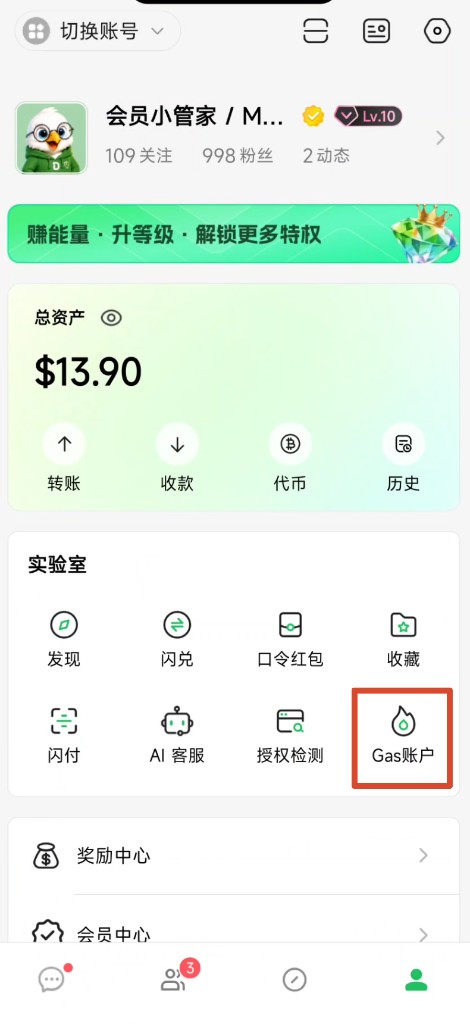
1. Open GasToken
- Open bottom Me.
- Under Lab, tap GasToken.
You may also tap Open GasToken / Deposit prompts inside Swap or transfer flows.
2. Review balance and sponsorship networks
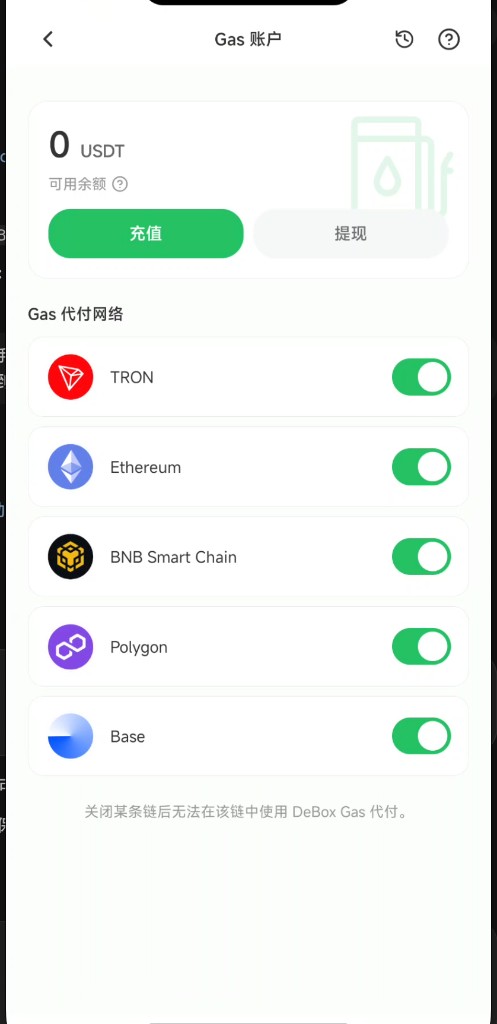
On GasToken you can see:
- Available balance (shown in USDT)
- Deposit / Withdraw
- History and FAQ via the top-right icons
- Gas sponsorship networks: toggles per chain (e.g. TRON, Ethereum, BNB Smart Chain, Polygon, Base—follow the live list)
On-page note: after turning a chain off, DeBox Gas sponsorship cannot be used on that chain.
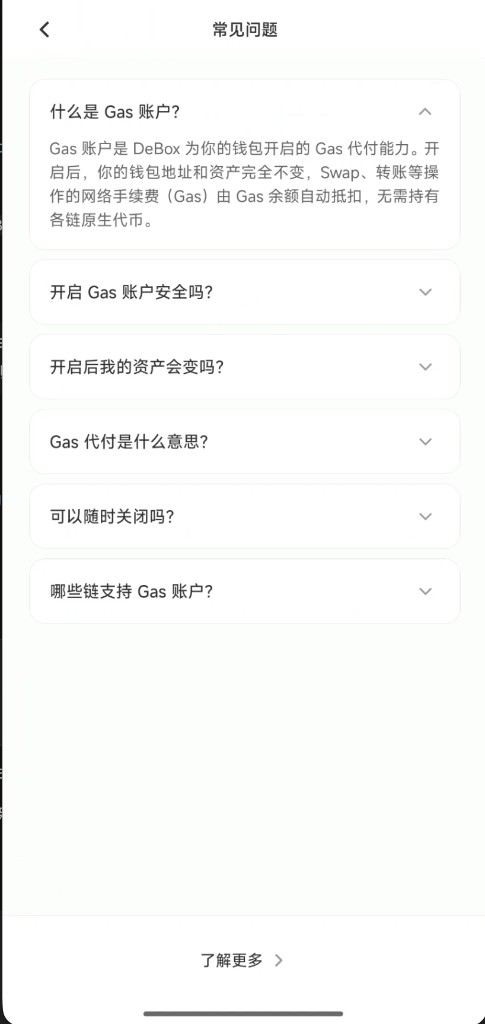
Open ? for in-app FAQ such as “What is GasToken?”.
3. Deposit Gas with USDT (or other tokens)
Best when you have USDT but little/no native BNB/ETH.
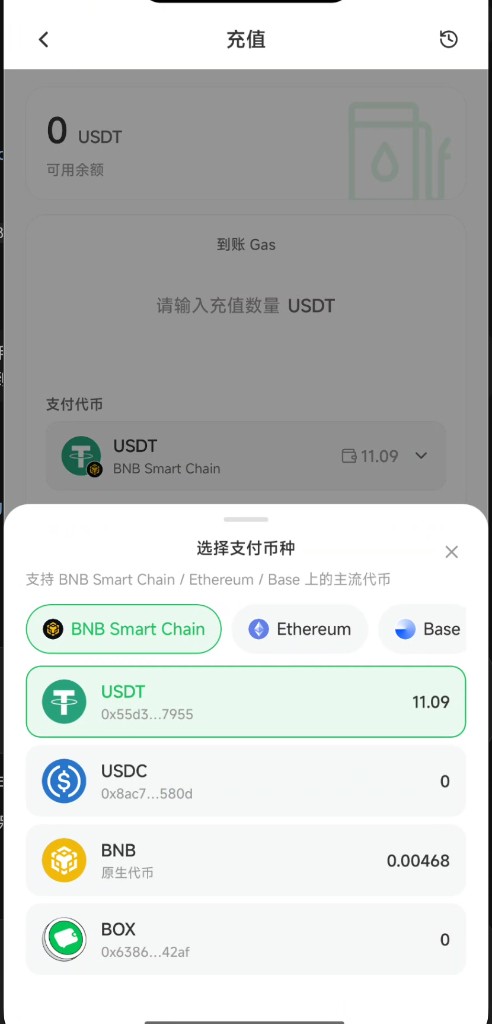
- Tap Deposit.
- Under Gas to receive, enter the amount (USDT-denominated; meet the minimum).
- Tap Payment token → Select payment currency.
- Switch network tabs (BNB Smart Chain / Ethereum / Base) and pick USDT (or USDC, BNB, BOX if listed).
- Review the estimated payment, tap Confirm deposit, and sign.
- Confirm arrival on the result screen or in Gas details.
Deposit notes (follow the page):
- Payment tokens convert to Gas balance at live rates; balance is priced in USDT. Non-stablecoins settle by on-chain receipt.
- Balance offsets on-chain Gas. Withdrawals usually support USDT only—not a refund to the original payment token.
- Minimum deposit/withdraw is commonly about 1 USDT.
4. Keep sponsorship on for the chains you use
After deposit, on GasToken home ensure the target chain (e.g. BNB Smart Chain) toggle is on. On a turned-off chain, sponsorship is unavailable.
Then in Swap/transfer, when routing supports it, network fees can be deducted from Gas balance without preparing native tokens first.
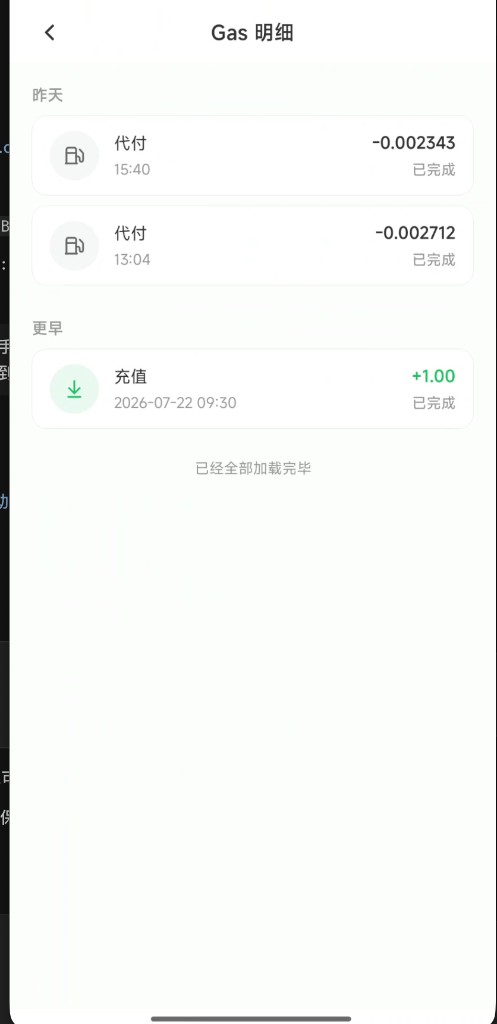
5. Check Gas details
Open the history entry to Gas details to review:
- Deposit: balance increases (e.g. +1.00)
- Sponsorship / pay-on-behalf: deducted Gas (e.g. -0.002…)
Use this to confirm deposits and actual fee sponsorship.
6. Withdraw (optional)
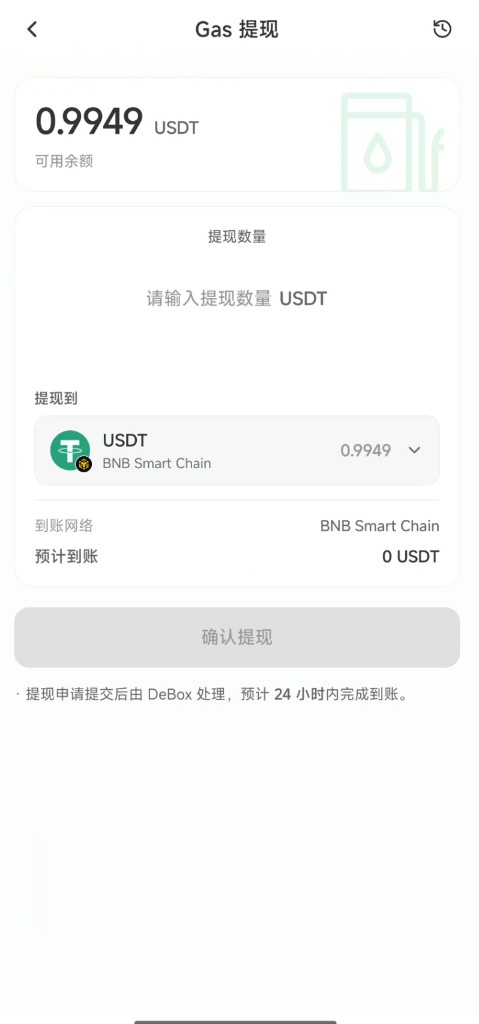
Unused Gas balance can be withdrawn (usually as USDT):
- Tap Withdraw (may be disabled if balance is too low).
- Enter the amount; confirm destination asset/network (e.g. BNB Smart Chain).
- Tap Confirm withdraw and complete verification.
On-page copy commonly says DeBox processes the request and arrival is expected within 24 hours (follow live status).
Tips
- Gas balance ≠ wallet USDT: only deposited Gas pays fees; undeposited USDT is not auto-used for Gas.
- Sponsorship also depends on chain toggles, remaining balance, and whether the action uses a sponsored route.
- For large actions, deposit a small amount first and confirm a sponsorship row in Gas details.
- After turning a chain off, that chain usually needs native tokens for Gas again.
Common questions
What is GasToken?
DeBox Gas sponsorship for your wallet. Address and assets stay the same; Swap/transfer network fees can be deducted from Gas balance without holding each native token (within supported scenarios/networks).
I only have USDT and almost no BNB—can I Swap or transfer?
Yes via this flow: deposit USDT → enable the chain toggle → retry Swap/transfer. If prompts remain, top up balance or check the toggle.
Is it safe?
It works only within your authorization and does not change keys/seed phrases; sensitive actions still need your confirmation.
Will my assets change?
No—only sponsorship is added.
What does Gas sponsorship mean?
In supported cases, Gas balance covers network fees so you rely less on native tokens (subject to balance, toggles, and routing).
Can I turn it off anytime?
Yes—toggle chains off or disable sponsorship per the page; you can re-enable later.
Which chains are supported?
Follow the Gas sponsorship networks list on the GasToken page (examples in screenshots: TRON, Ethereum, BNB Smart Chain, Polygon, Base).
Swap asks me to open or deposit?
Follow the button into GasToken, then return to Swap. See How do I use Swap?.
How long does withdraw take?
Product copy often estimates within 24 hours; follow page status and actual arrival.