
How do I receive USDT or BNB?
What this guide covers
Deposit assets into your DeBox wallet, with a focus on receiving USDT and BNB on BNB Chain:
- Withdraw from an exchange (e.g. Binance) to DeBox
- Transfer from another wallet app to DeBox
Key rule: the receive network must match the sender/withdrawal network, or funds may be lost permanently.
To send out from DeBox, see How do I transfer assets?.
Requirements and before you start
- You are signed in to DeBox with a usable wallet.
- Examples below use BNB Chain (BEP20) for USDT / BNB. For other chains, switch the network on the Receive page first.
- Exchange fees, minimums, and ETA follow the live exchange UI (screenshots are examples only).
- Before a large deposit, send a small test amount first.
- The address usually only receives assets on the selected network; wrong-network sends may be unrecoverable.
- Never share seed phrases, private keys, or PINs; ignore anyone asking you to “verify” by sending funds again.
- Addresses and balances in screenshots are examples—always copy from your own Receive page.
Steps
1. Open Receive in DeBox
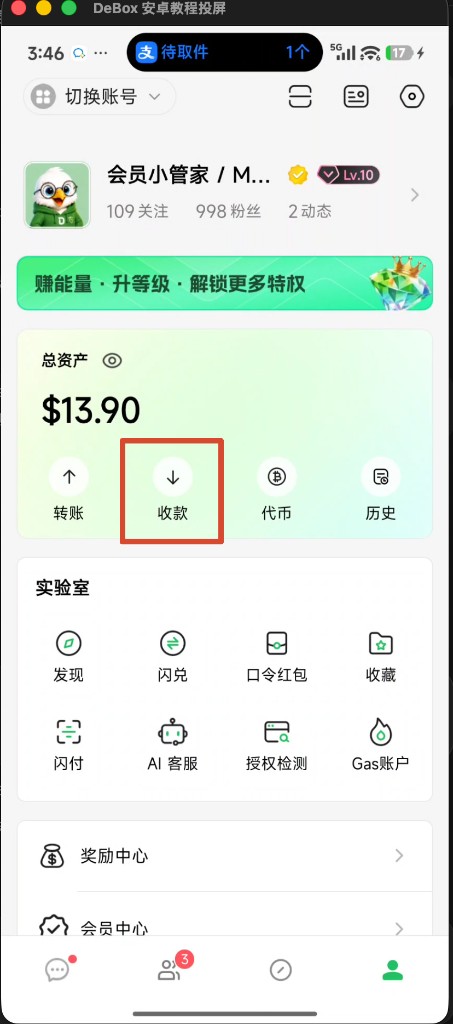
- Open DeBox and go to bottom Me.
- Under Total assets, tap Receive.
You can also open Tokens first, then tap Receive (follow the current UI).
2. Confirm network and copy the address
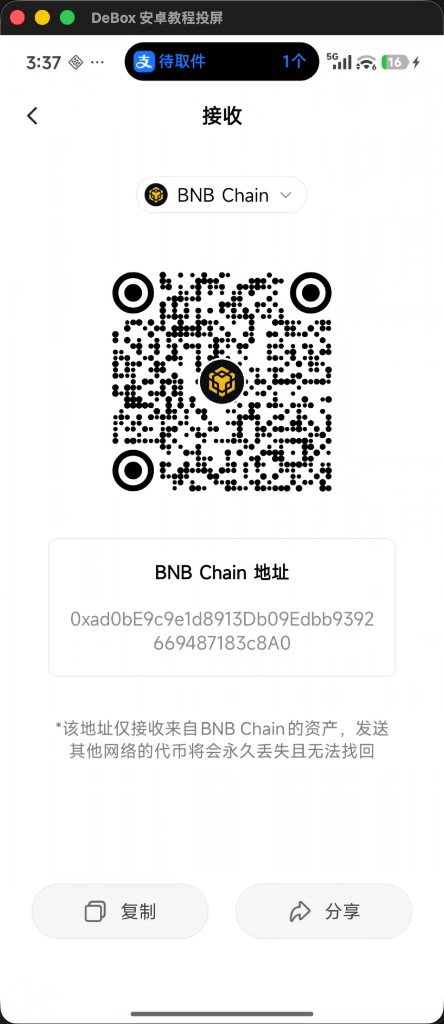
- At the top of Receive, confirm BNB Chain (when receiving BNB Chain USDT / BNB).
- Review the BNB Chain address and QR code.
- Tap Copy, or Share / let the sender scan the QR.
On-page warning commonly says: this address only receives assets from BNB Chain; tokens sent on other networks may be lost permanently.
3. Withdraw USDT / BNB from an exchange to DeBox
Typical exchange flow (labels vary by exchange):
- Open the exchange app and start a USDT or BNB withdrawal/transfer.
- Paste your DeBox address into Address (or scan the DeBox QR).
- Under Network, choose the matching network, e.g. BSC / BNB Smart Chain (BEP20).
- Do not pick ETH (ERC20), TRC20, or other networks that do not match Receive.
- Enter the amount; review receive amount and network fee.
- Complete the exchange security checks and submit.
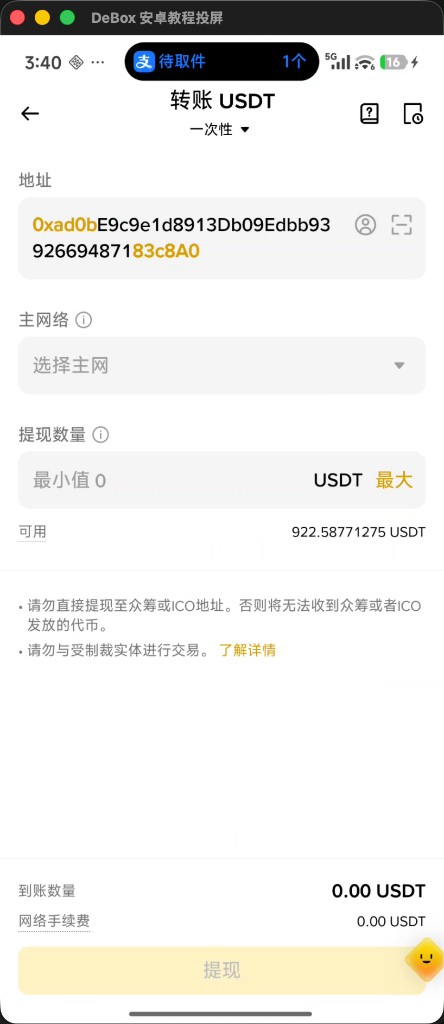
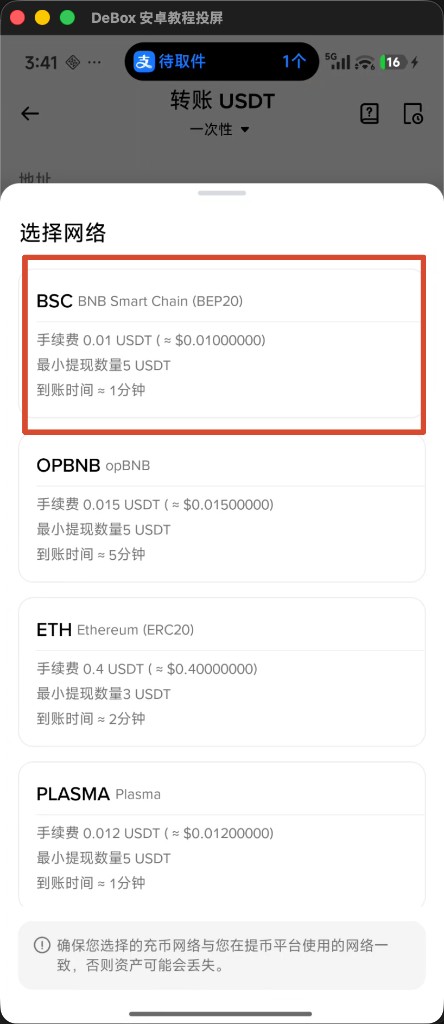
Double-check address, network, and amount, then submit:
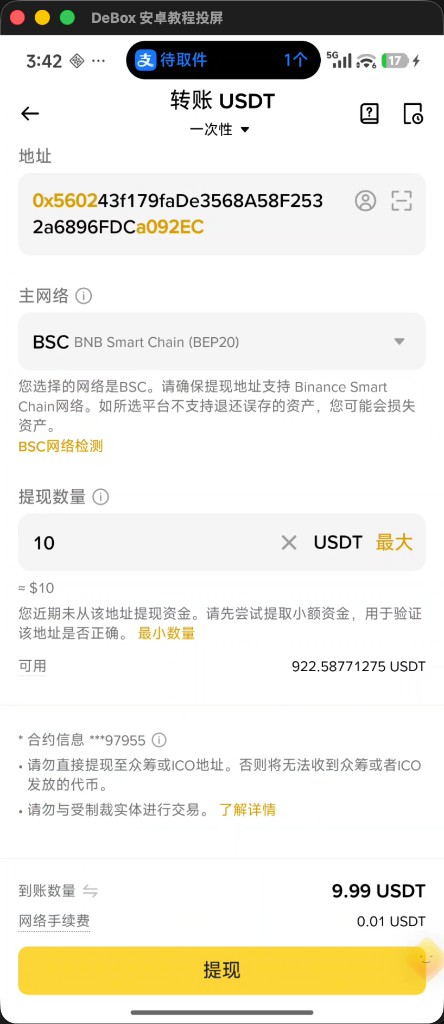
Same flow: keep BNB Chain on DeBox Receive and copy the address; when withdrawing BNB on the exchange, also choose BSC / BNB Smart Chain.
4. Transfer from another wallet app to DeBox
- In the other wallet, open Send / Transfer.
- Select USDT or BNB, and network BNB Chain / BSC.
- Paste the DeBox address or scan the Receive QR.
- Enter the amount; for USDT on BNB Chain the sender usually needs a little BNB for gas.
- Confirm and sign.
5. Verify arrival in DeBox
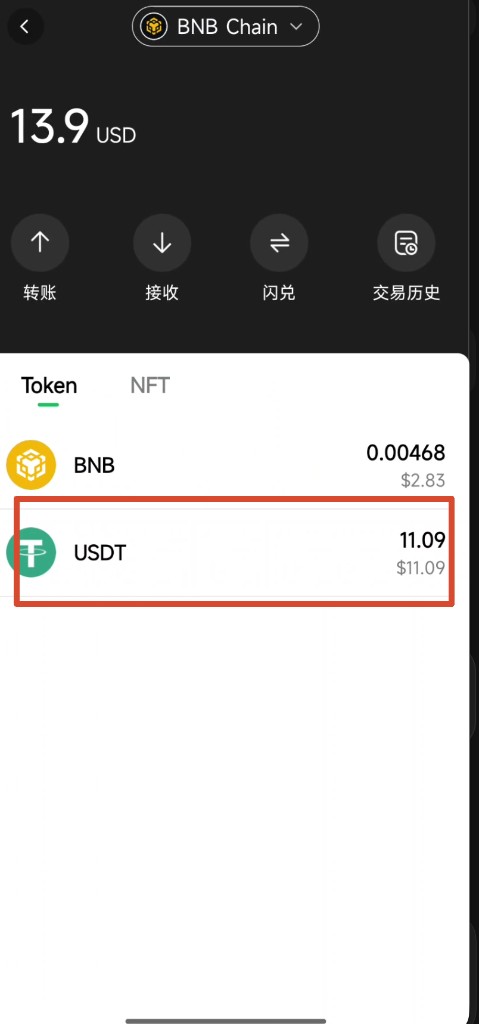
- Return to Me or the assets page; ensure the top network is BNB Chain.
- Check USDT / BNB balances under Token.
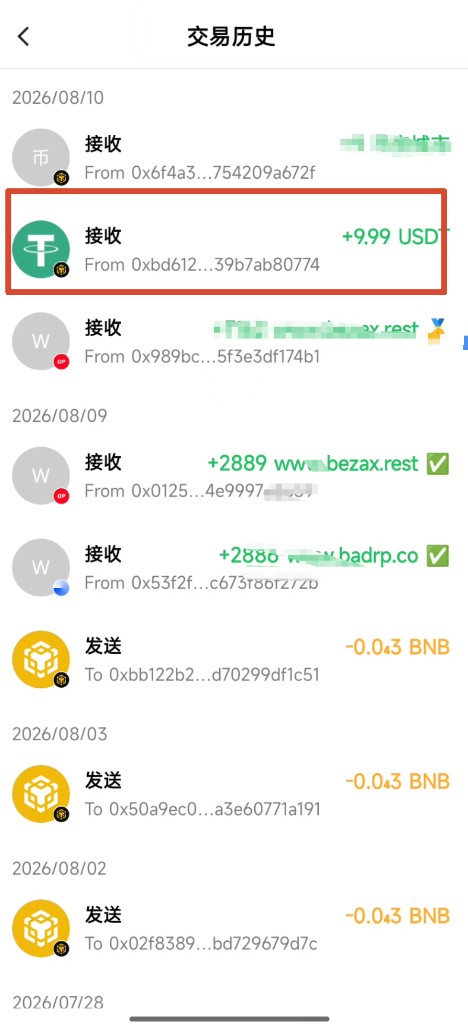
- Or open History and look for Receive entries (often shown in green with +).
Chain confirmation takes time; after the exchange shows complete, DeBox may refresh slightly later—pull to refresh or check again.
Tips
- Match network first, then the address.
- Test with a small amount before large transfers.
- Addresses can look similar across chains—trust the network selected on Receive.
- If delayed, find the TxID on the exchange and compare with DeBox History.
Common questions
Why pick BSC when withdrawing USDT?
USDT exists on many chains. If DeBox Receive shows a BNB Chain address, withdraw BEP20 / BSC USDT—not ERC20 or TRC20.
I chose the wrong network. What now?
Often funds cannot be recovered by support. Stop further wrong-network sends, keep the TxID, and follow chain/platform rules—this guide makes no recovery promise.
Exchange deducted funds but DeBox shows nothing?
Confirm withdrawal status and on-chain confirmation, and that DeBox is on the matching network (e.g. BNB Chain). If it stays missing, keep the TxID and contact support via How do I submit feedback?.
Receive vs transfer?
Receive is inbound to your DeBox address; transfer is outbound from DeBox. See How do I transfer assets?.