
How do I transfer assets?
What this guide covers
Send assets from your DeBox wallet to another person or address, with a focus on USDT / BNB on BNB Chain (other chains are similar—switch network first).
Common entries:
- Me → Transfer (from assets)
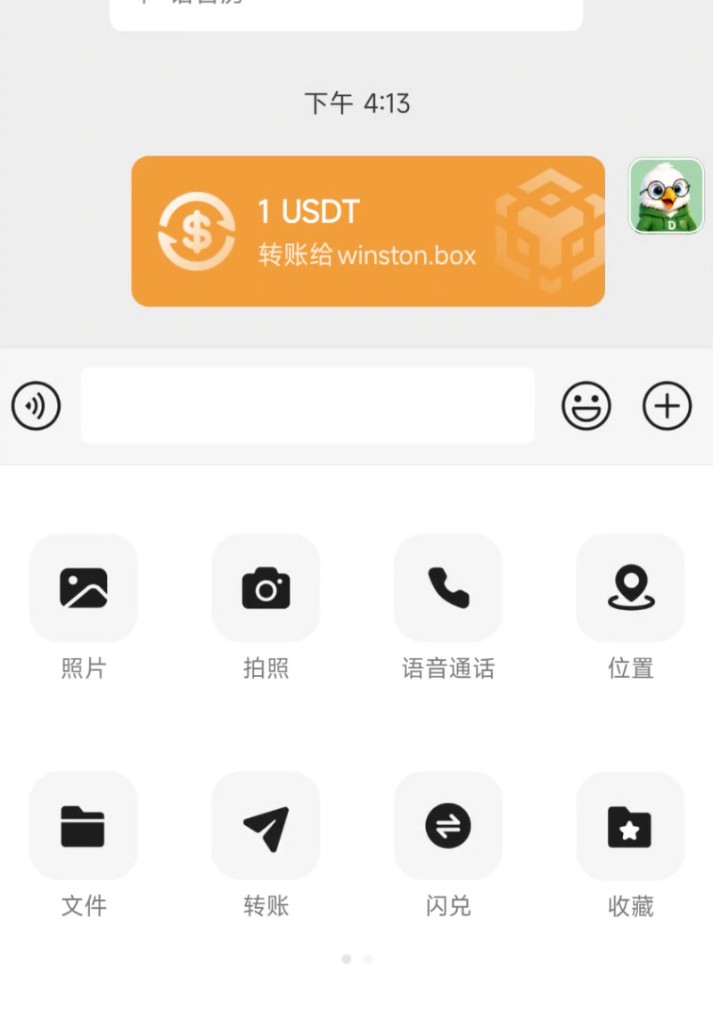
- Chat → + → Transfer (to the chat partner)
To deposit into DeBox, see How do I receive USDT or BNB?. If you lack native gas, see How do I use GasToken?.
Requirements and before you start
- You are signed in and have tokens or NFTs to send.
- Confirm the recipient address and receive network; wrong-network sends may be unrecoverable.
- Transfers usually cannot be reversed after confirmation—double-check before signing.
- Network fees may be paid with native tokens or GasToken sponsorship (follow the authorization screen).
- Transfers are hard to reverse: verify address, network, and amount.
- Never share seed phrases, private keys, or PINs.
- For “new address” / “contract address” prompts, verify yourself before continuing.
- Names and addresses in screenshots are examples—use your own page.
Steps
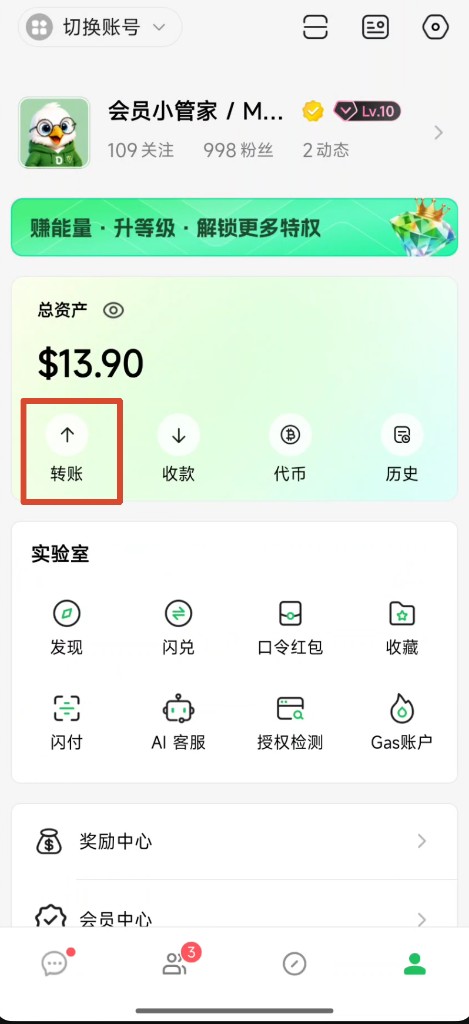
1. Open Transfer (assets entry)
- Open bottom Me.
- Under Total assets, tap Transfer.
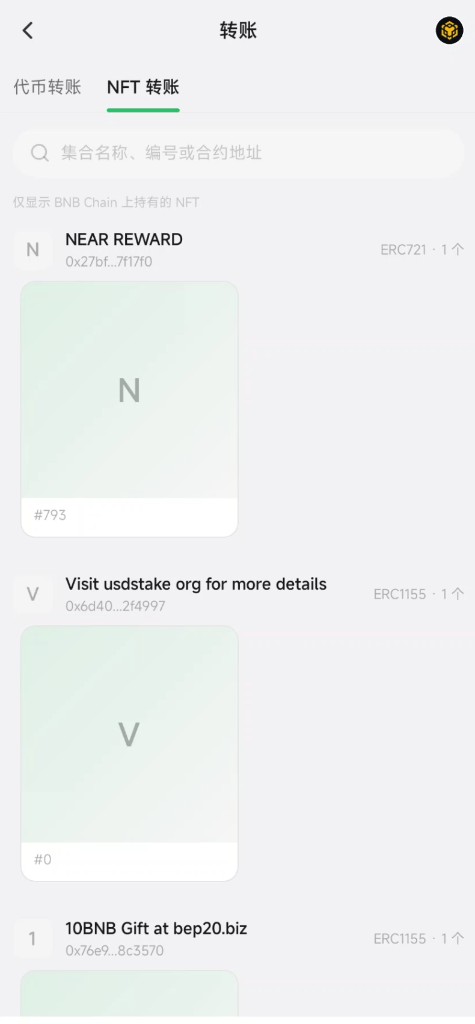
You usually land on Token transfer; you can switch to NFT transfer.
2. Select network
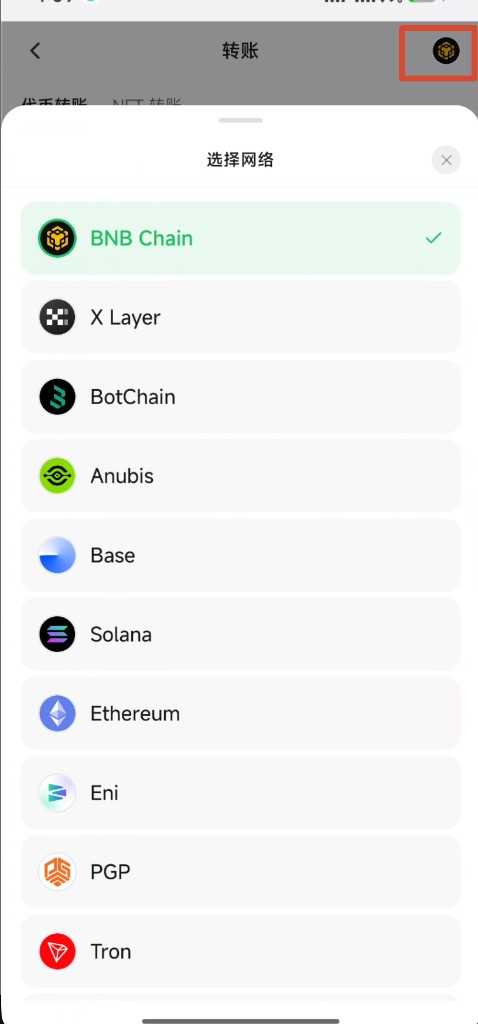
- Tap the network icon (top-right) to open Select network.
- Choose the network that matches the recipient (example: BNB Chain).
- The list may only show tokens with balance on that chain.
For BEP20 USDT or BNB, select BNB Chain—not Ethereum, Tron, etc.
3. Select the token (USDT / BNB)
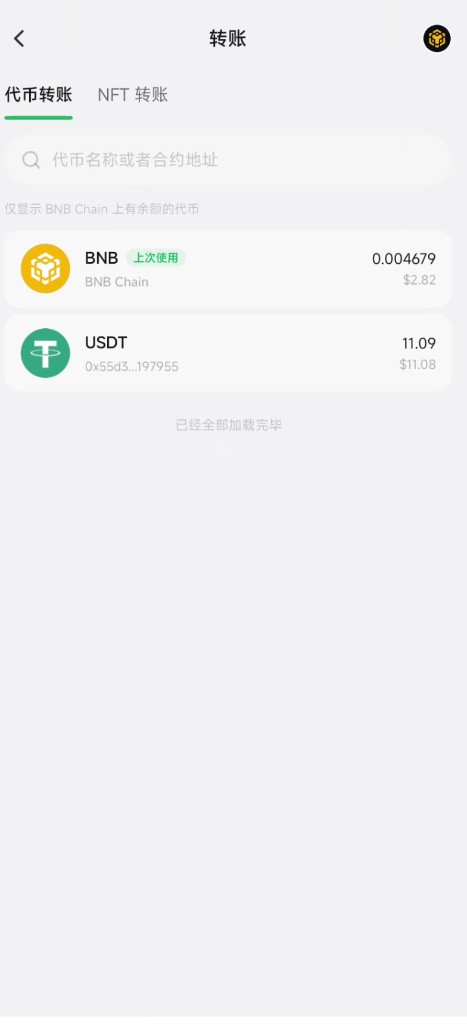
- Stay on Token transfer.
- Tap USDT or BNB (search by name or contract if needed).
- A Last used tag may appear for quick reselection.
4. Enter recipient address
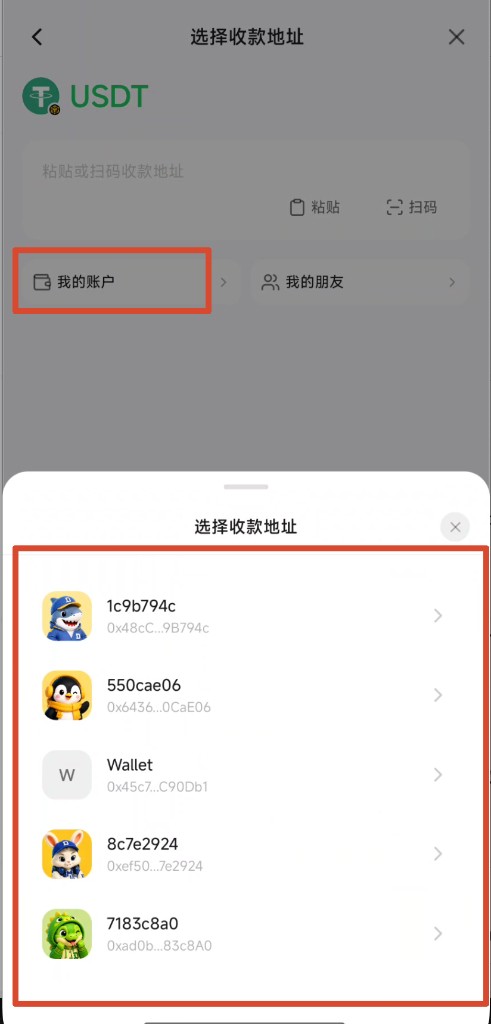
On the address step, pick one:
- Paste the address or Scan the recipient’s QR.
- My accounts: send to another of your wallets.
- My friends: pick from friends (if available).
Continue only after the address looks correct. From chat entry, the recipient may be pre-filled.
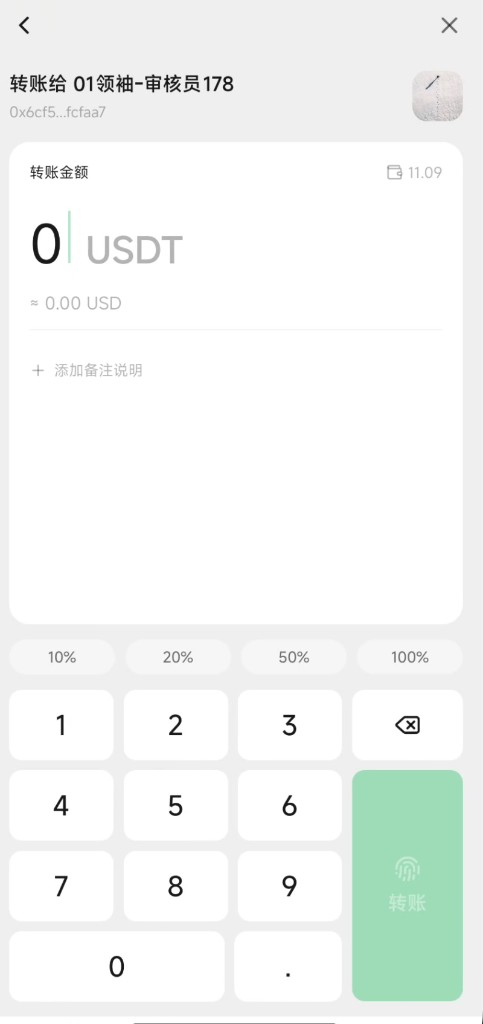
5. Enter amount and submit
- Confirm recipient name and address summary.
- Enter the amount (optional 10% / 20% / 50% / 100% shortcuts).
- Add a memo if needed.
- Tap Transfer and complete fingerprint / Face ID / PIN as prompted.
6. Confirm the authorization request
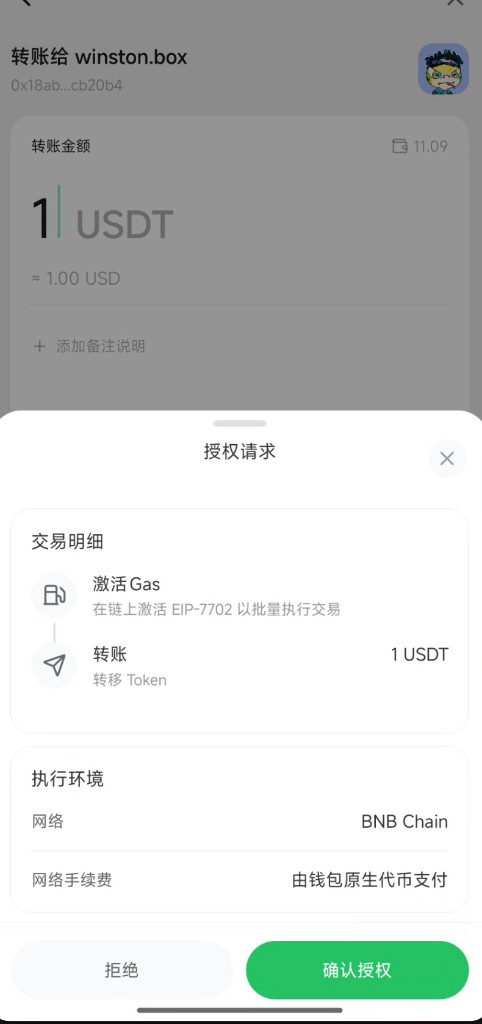
Some versions show an Authorization request sheet—read it, then Confirm authorization:
- Details: may include Activate Gas and Transfer (e.g. EIP-7702 batching—follow on-page copy).
- Network: e.g. BNB Chain.
- Network fee: may say paid by wallet native token, or use GasToken sponsorship.
If prompted to open/deposit GasToken, finish that first. See How do I use GasToken?.
7. Check the result
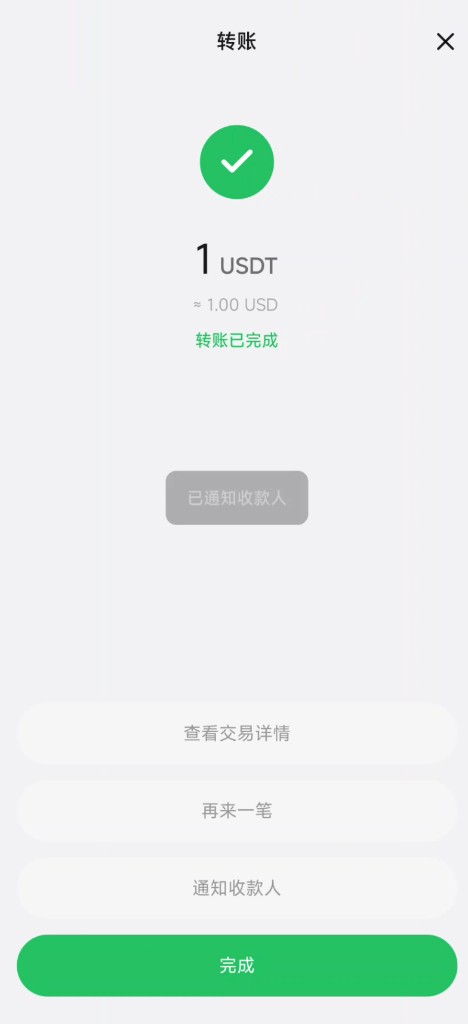
On success you usually see Transfer completed, with options to:
- View transaction details
- Send another
- Notify recipient
- Tap Done
Final on-chain status follows details / explorers; chat transfers may also show a transfer card in the thread.
Option B: Transfer from chat
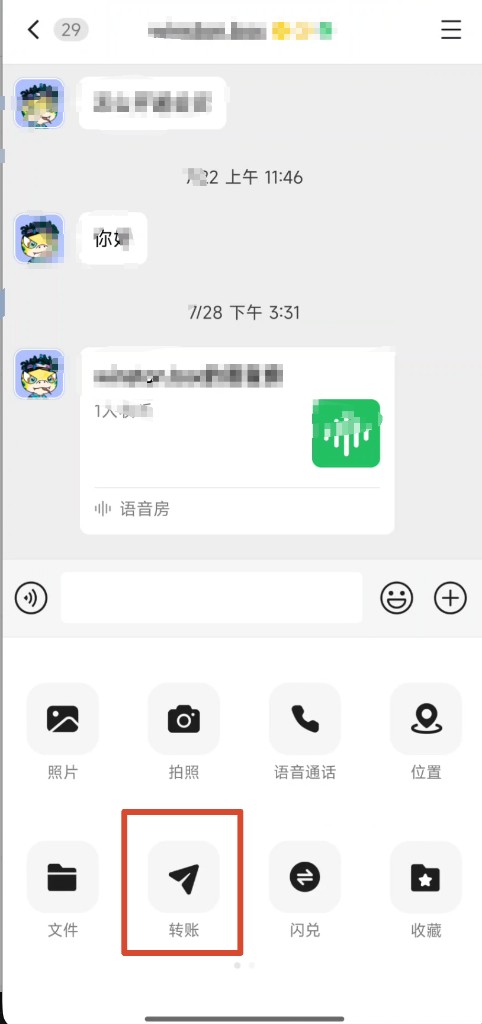
When you are already chatting:
- Open the chat.
- Tap + next to the input, then Transfer.
- Choose token and amount, then authorize (same checks as above).
- A transfer card may appear in the chat (e.g. “1 USDT transfer to …”).
NFT transfer (extra)
- Switch to NFT transfer.
- Confirm the network; the list usually shows NFTs held on that chain only.
- Select the NFT → enter recipient → confirm and sign.
Follow the live App for fields and confirm screens.
Tips
- Match network first, then address and amount.
- Test with a small amount before large sends.
- Sending USDT may still need a little native token or GasToken balance for fees.
- Check Me → History alongside any chat transfer card.
Common questions
Can I reverse a wrong address?
Usually not after on-chain confirmation. Double-check before signing.
Gas insufficient or deposit required?
Top up or open GasToken, or hold native gas for the network. See How do I use GasToken?.
Why is a token missing from the list?
Wrong network, zero balance, or not listed. Switch network, search by contract, or receive first.
Transfer vs Swap?
Transfer sends to an address; Swap exchanges tokens. See How do I use Swap?.
Chat transfer vs assets transfer?
Chat often pre-fills the contact; assets page is better for paste/My accounts. Both need the same network/amount checks and signature.