
How do I use group chat buy danmaku?
What this guide covers
Explains DeBox group buy danmaku: after you open a trade from a group chat and successfully buy a token, a buy danmaku (floating banner) appears at the top and a buy record stays in the chat so members can discover and follow the trade; and how owners / admins use Trade broadcast to reduce spam from unrelated tokens.
Requirements and before you start
- DeBox App is installed and you can sign in.
- You are in a group chat where you can see a token market card, contract address (CA), or an existing buy danmaku / buy-record entry.
- Completing a buy requires signing and on-chain confirmation in the DeBox App. Prepare the token balance and Gas for the network (or follow on-screen GasToken prompts).
- To change Trade broadcast, you must be the group owner or an admin.
Only buys that start from a group chat and complete inside the DeBox App are shown. Sells, failed trades, external-wallet fills, or trades without a group source are not shown. Buy danmaku and buy records appear only in the source group, not in other groups.
By default, matching buys are all broadcast (top danmaku + in-chat buy row). If the owner/admin turns Trade broadcast off, only buys of tokens on the group watchlist are broadcast (see below).
Video walkthrough
Steps
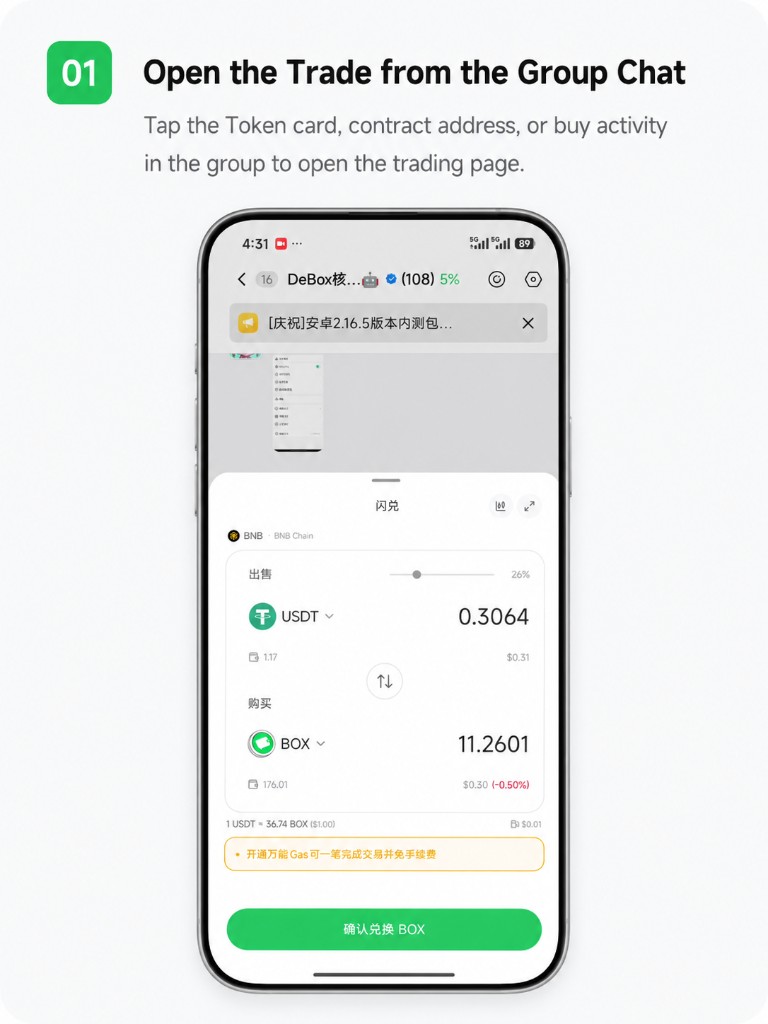
1. Open the trade from the group chat
In the group, tap a token market card, contract address (CA), or an existing buy record to open the trading page (for example Flash Swap).
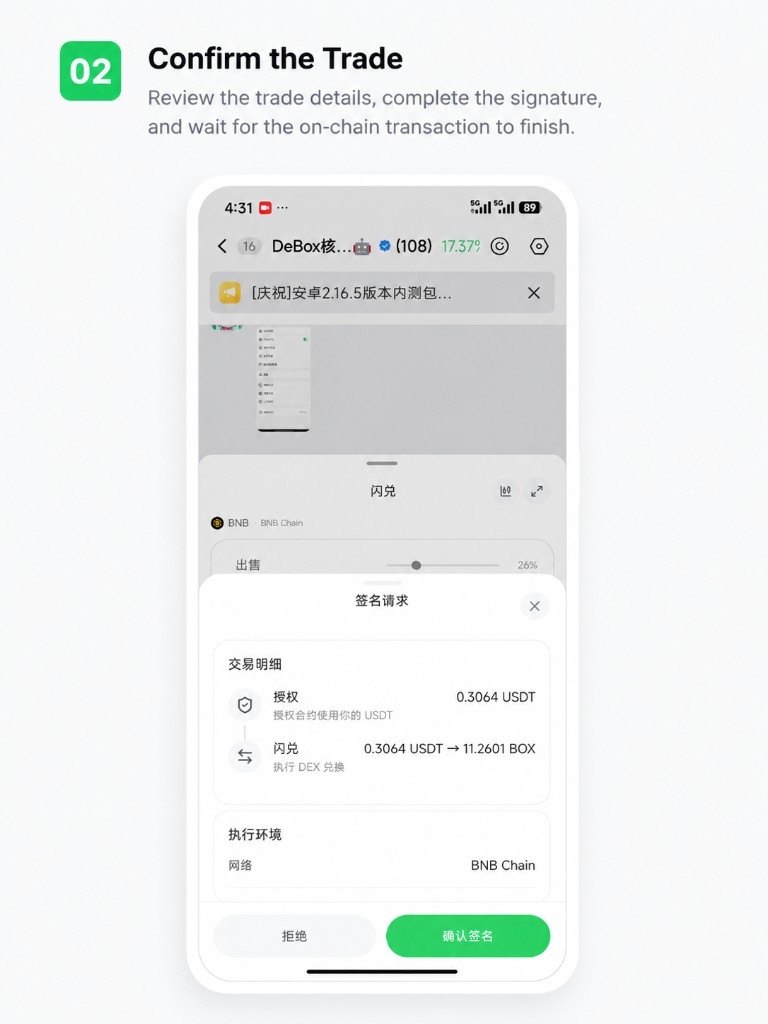
2. Confirm the trade
Review the sell/buy tokens and amount, confirm the details, complete the signature, and wait for the on-chain transaction to finish.
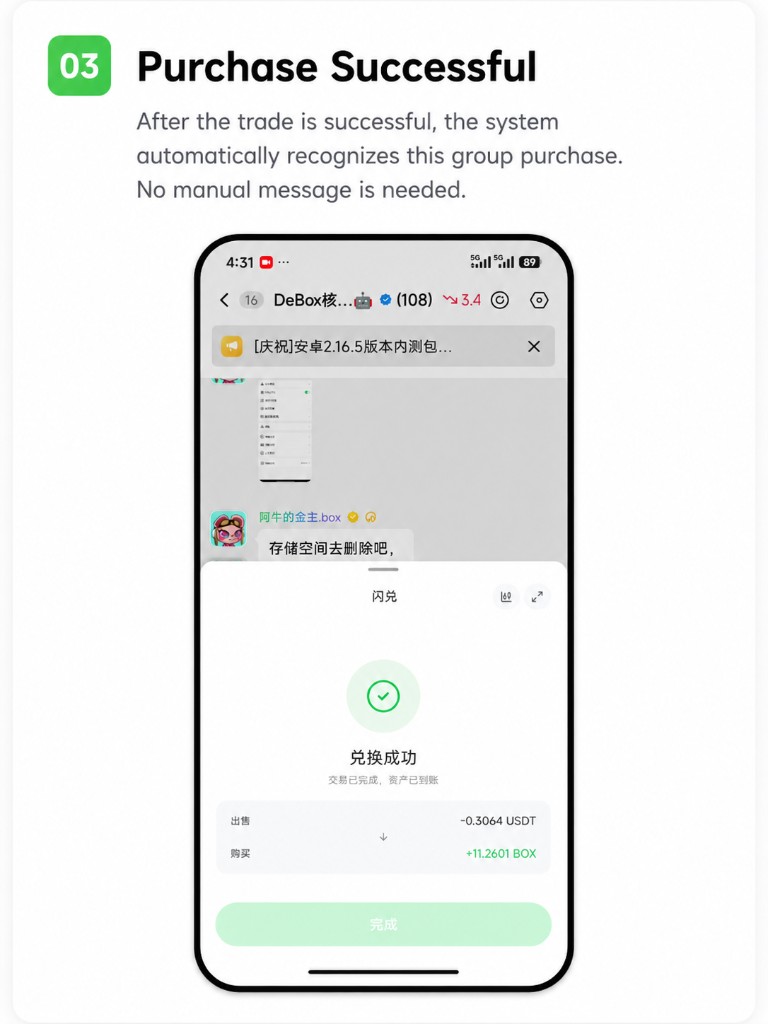
3. Purchase successful
After the trade succeeds, you do not need to send a message manually. The system recognizes this group buy automatically.
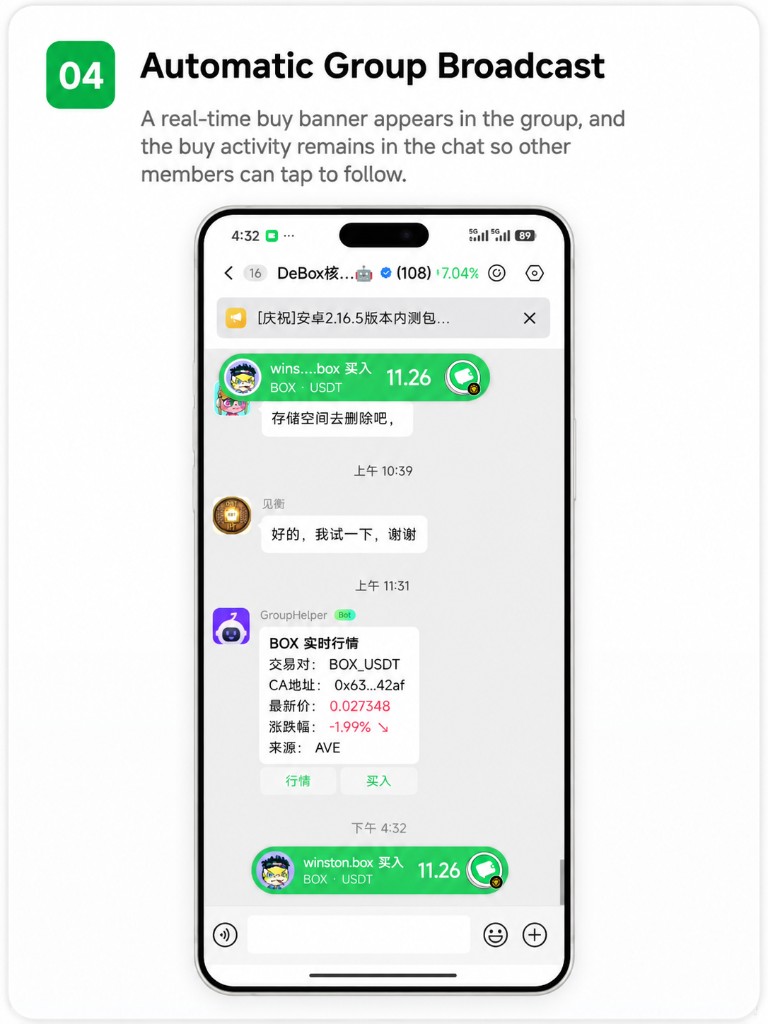
4. Buy danmaku appears in the group
If Trade broadcast is on (default), or it is off but the token is on the group watchlist:
- Top floating layer: a real-time buy danmaku
- Chat area: a buy record stays in the timeline
Other members can tap the token to view the market or follow the buy.
Owners / admins: manage Trade broadcast
By default the group broadcasts all successful buys attributed to this group (danmaku + chat record). To reduce ad spam, turn the switch off so only group watchlist tokens are broadcast.
How to toggle
- Open Chat settings → More settings (owners and admins can enter).
- Find Trade broadcast (above Disband group; disband is owner-only).
- On = Broadcast all buys in the group; Off = filter non-watchlist tokens only (watchlist tokens still show danmaku and records—see below).
- The ? next to the title opens this help page.
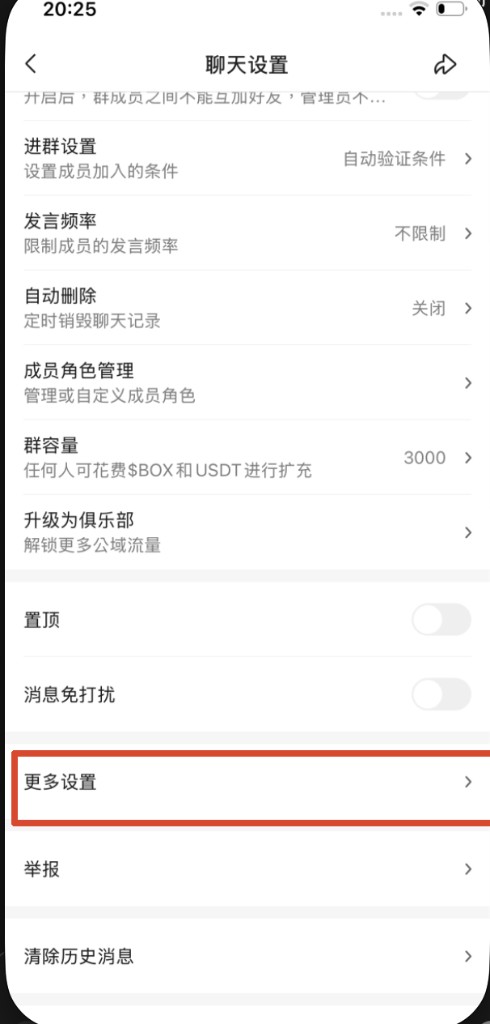
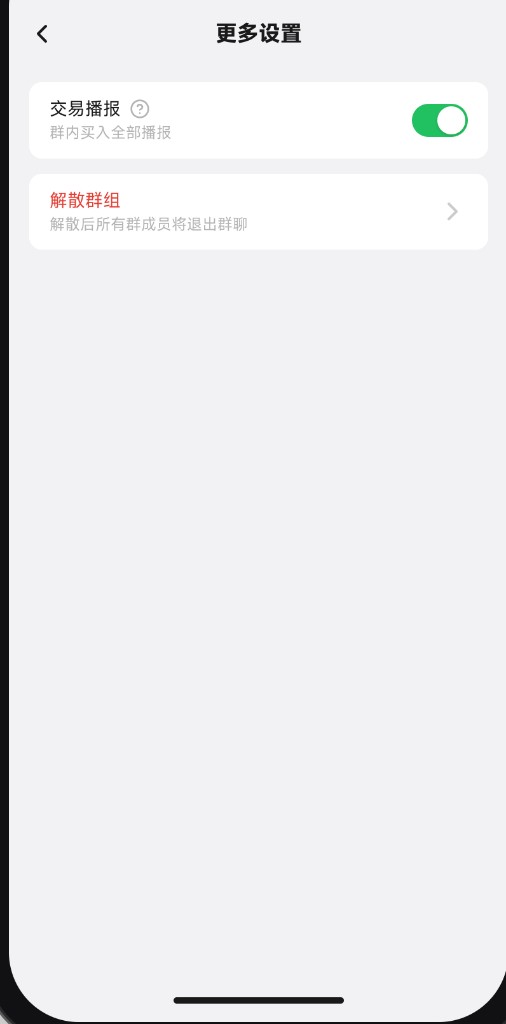
Turning Trade broadcast off does not stop members from opening trades from the group, and does not affect whether a trade succeeds. It only filters the buy danmaku and in-chat buy rows. Market cards and CA messages are not hidden by this switch.
What happens when it is off
The group watchlist is a whitelist: tokens on it are not blocked when Trade broadcast is off—successful buys still show danmaku and chat records. Turning the switch off only filters tokens outside the watchlist.
| Case | Result |
|---|---|
| Switch on (default) | All successful group-attributed buys broadcast (danmaku + record) |
| Token on group watchlist (whitelist) | Shows danmaku and record whether the switch is on or off |
| Switch off, token not on watchlist | No danmaku and no new buy row |
| Switch off, watchlist empty | No buys broadcast |
How to add tokens to the watchlist (whitelist)
- Open the group chat and use the top-right entry to open group watchlist / Recommended tokens.
- Tap Add token and add tokens you still want broadcast when the switch is off.
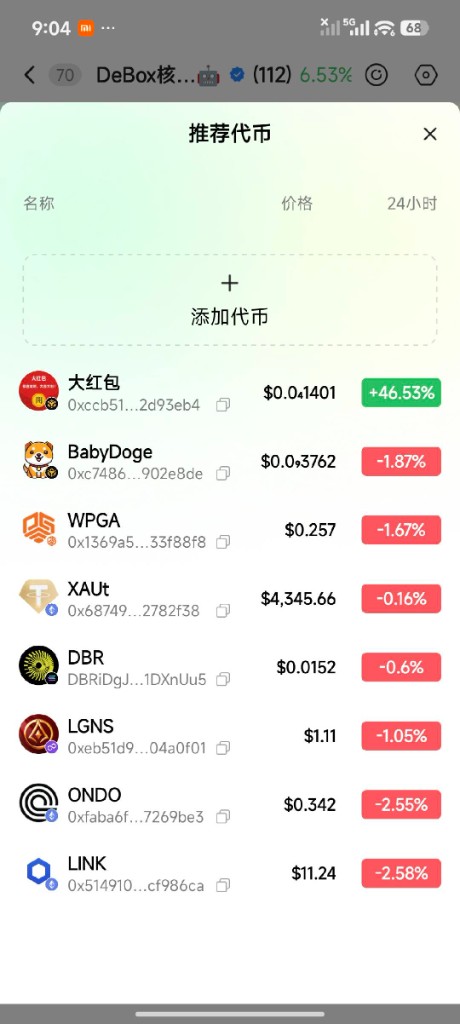
After you add/remove tokens, new fills follow the current list; historical buy rows are usually not removed retroactively.
Regular members cannot see or change the Trade broadcast switch. When it is off, chat shows no “broadcast limited” notice.
FAQ
I bought a token—why is there no buy danmaku in the group?
Check the following (no top danmaku and no new buy row in chat):
- Did you enter the trade from a market card / CA / buy record inside this group? Opening swap from Wallet or other entries usually has no group source.
- Did you complete signing and settlement inside the DeBox App? External-wallet fills are not shown.
- Was it a successful buy? Sells and failed trades are not shown.
- Buy danmaku appears only in the source group, not elsewhere.
- Is Trade broadcast off, and is the token not on the group watchlist (or is the watchlist empty)? Ask an owner/admin, or add the token to the watchlist and try again.
If all of the above apply and nothing appears, pull to refresh the chat. If it still fails, contact official support with the trade time and group name.
How do I stop buy-danmaku spam in the group?
Owners or admins: Chat settings → More settings → Trade broadcast, turn it off. That filters non-watchlist tokens only; watchlist tokens are a whitelist and still show danmaku and records. Manage the list via top-right Recommended tokens → Add token. Off ≠ fully muted.
Are watchlist tokens turned off too?
No. Watchlist tokens are a whitelist: with the switch off, buys of listed tokens still show danmaku and chat records; only tokens outside the list are filtered.
Who can change Trade broadcast?
Only the owner and admins. Regular members cannot see or change it. Admins can use More settings for this switch but do not see Disband group (owner-only).
What can other members do after seeing a buy danmaku?
They can tap the danmaku, buy record, or token card to open the trading page and follow the buy. They must still confirm the amount and sign themselves.
What if Swap errors or the signature fails?
See How do I use Swap? and How do I use GasToken? for balance, network, and Gas issues. Failed trades do not create buy danmaku.